What is useArtemis?
useArtemis finds B2B leads and their verified emails, then contacts them with LinkedIn and email sequences. See what each part does and how they fit.
Updated October 27, 2026
On this page
useArtemis is a B2B prospecting tool. You find the people you want to reach, get their verified professional emails, contact them with automated LinkedIn and email sequences, and follow the conversations from one place. It runs in your browser at https://app.useartemis.co, nothing to install.
Who it's for
useArtemis is made for people who look for new customers: founders, sales managers, SDRs and BDRs, marketers, recruiters, and agencies that run outreach for their clients.
You can use it for the whole process, from the first search to the reply, or for one part only, for example to get verified emails for a list you already have.
What you can do with useArtemis
Find leads
- Discover searches millions of people and companies by job title, company, location and industry, with two tabs: People and Companies.
- The AI agent does it for you in a conversation: tell it what you sell and who you want to reach, and it proposes target segments, finds the people, saves them to a list, prepares your LinkedIn campaign and launches it once you approve. See Get started with the AI agent.
- Upload a CSV file imports leads you already have.
- The Chrome extension saves the LinkedIn profile you're viewing to a list or a campaign, finds the person's email, and exports LinkedIn and Sales Navigator searches to a list. See Find emails on LinkedIn with the Chrome extension.
Every lead lands in a list under Prospects, where you can enrich it, export it or use it in a campaign.
Find and verify emails
- Enrich a whole list with professional emails from Prospects.
- Finder shows the people and email addresses behind a company domain, with the company's most common email format.
- Verifier checks that an address exists before you send to it. It costs 1 credit per email.
Contact your leads with campaigns
A campaign runs a sequence of steps for every lead of a list:
- LinkedIn steps: Visit profile, Send an invite, Send a message, Like recent post and Withdraw request.
- Email steps: Send an email, sent from your own mailbox (Gmail, Outlook, or another mailbox with SMTP and IMAP).
- Logic: Delay, conditions such as "accepted invite" or "replied message", filters and an AI message analysis of replies.
You don't have to write the messages yourself: Write it with AI asks for your offer and your goal, then writes the invitation and every follow-up. By default, a lead who replies leaves the sequence, so nobody gets a follow-up after answering. The Queue shows the next scheduled action for every lead of your running campaigns.
Follow the conversations
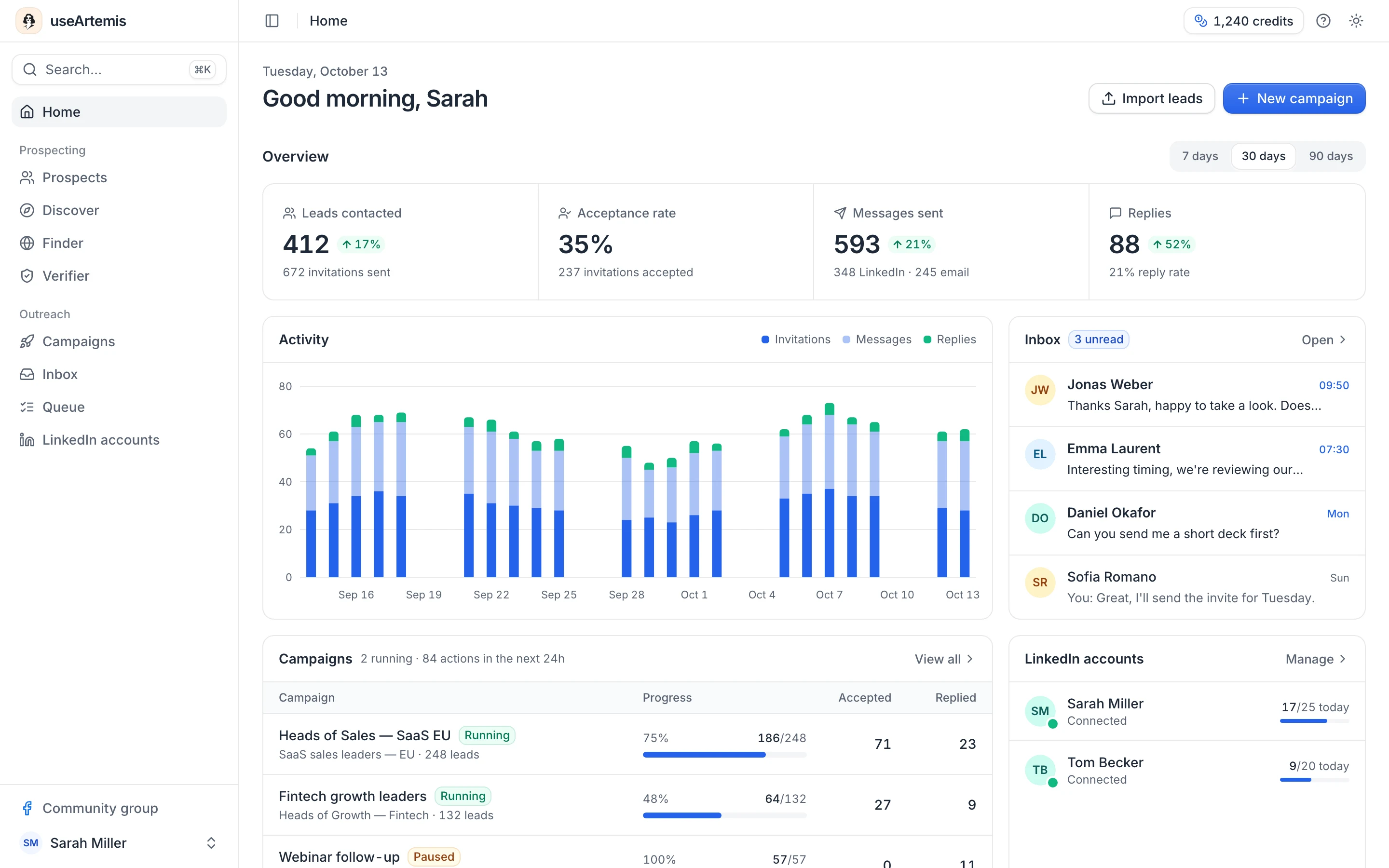
The Inbox gathers the conversations of your connected LinkedIn accounts, with replies you can draft with AI. The Home page sums up your activity: leads contacted, acceptance rate, messages sent and replies.
How the pieces fit together
- Build a list of leads: search Discover or upload a CSV.
- Find and verify their emails if you want to email them.
- Connect the accounts you send from: LinkedIn in Settings › LinkedIn accounts, mailboxes in Settings › Email accounts.
- Create a campaign on the list and launch it.
- Answer the replies and follow your results on Home and in each campaign.
The quick start walks you through these steps.
Plans, credits and the free account
Finding and verifying emails and getting leads from Discover use credits. Each plan includes a number of LinkedIn accounts, verified emails and Discover leads, and unused credits roll over. Compare them on the pricing page and in Plans and credits.
New accounts are free accounts: no card and no time limit. You can use Discover, import and build lists, and prepare campaigns with the AI agent, with daily limits. Finding emails, connecting LinkedIn or a mailbox and launching campaigns come with a subscription, which you can start at any time. See Free account: what's included.
Note: AppSumo Lifetime accounts include the prospecting tools (lists, email finder and verifier). Campaigns, LinkedIn accounts, Discover and the AI agent need a subscription. See AppSumo.
FAQ
Can I use useArtemis without LinkedIn?
Yes. Importing leads, finding emails and verifying them don't need a LinkedIn account. Campaigns can run on email only too: a LinkedIn account is only required by LinkedIn steps. Connect a mailbox in Settings › Email accounts, then build a sequence with Send an email steps. The sequences useArtemis creates for you start with LinkedIn steps, so replace them with email steps in the sequence builder. Replies arrive in your own mailbox, and useArtemis detects them to stop the sequence for that lead.
What you won't get without LinkedIn: LinkedIn steps, and the Inbox, which shows LinkedIn conversations.
Do I need to install something?
No. useArtemis is a web app that runs in the cloud: you use it in your browser, and your campaigns keep running when your computer is off.
Does useArtemis use my LinkedIn password?
No. You log in on a secure LinkedIn connection page, and useArtemis never sees or stores your password. See Connect your LinkedIn account.
Was this article helpful?
Related articles
Still need help?
Write to hello@useartemis.co with your account email and what you were trying to do.