The Kanbox alternative that follows up by email too
Kanbox organizes your LinkedIn inbox in pipelines and automates LinkedIn steps. useArtemis puts LinkedIn and email in the same sequence, finds new leads in a B2B database and includes verified emails, with 2 LinkedIn accounts from $69 a month.



4.8/5 from 1,100+ reviews · 15,000+ users
At a glance
Public info, October 2026
Monthly price
Team of 5 senders15,000+
users
$69
a month to start
2 to 10
LinkedIn accounts per plan
$0
to create your account, no credit card required
Rated 4.8/5 by founders, sales teams and agencies
G2
200+ reviews
Chrome Web Store
490+ reviews
Capterra
200+ reviews
AppSumo
300+ reviews
Key differences
Why teams switch from Kanbox
Kanbox is built around the LinkedIn inbox and its Kanban pipelines. useArtemis is built around finding leads and reaching them on more than one channel.
LinkedIn and email in one sequence
Kanbox sequences stay on LinkedIn: visits, follows, likes, invitations and messages. In useArtemis, a lead who doesn't accept your invitation can get an email from your Gmail, Outlook or SMTP mailbox, in the same sequence.
Leads beyond your LinkedIn searches
Kanbox imports leads from LinkedIn, Sales Navigator, Recruiter, posts and events. useArtemis adds Discover, a database of millions of B2B people and companies to search by title, company, location and industry.
Several accounts in one plan
Kanbox Pro, the plan with its AI reply agent, costs €80 per LinkedIn account a month. Our Scale plan covers up to 5 accounts for $159, with 1,500 verified emails.
Feature comparison
Kanbox and useArtemis, feature by feature
From Kanbox's pricing page and help center. Kanbox goes further on LinkedIn CRM features, useArtemis on email, leads and contact data.
B2B lead database
Import LinkedIn and Sales Navigator searches
Import post commenters and event attendees
Lead magnet automation
Import a CSV file
Email finder
Verified emails included each month
Phone numbers
Profile visits, invitations and messages
Like posts
Follow a profile
Email steps in the same sequence
Waits and conditions with two branches
AI-written message for each lead
AI replies to leads on LinkedIn
AI lead scoring against your ICP
A/B testing of messages
LinkedIn inbox
Tags, notes and reminders
Kanban pipelines
Several LinkedIn accounts
Cloud-based
Integrations
Free plan or trial
Pricing model
Cheapest plan
1 LinkedIn account
5 LinkedIn accounts
10 LinkedIn accounts
Comparison based on public information as of October 2026. Features and prices change: check Kanbox's website for its current offer.
Price comparison
Several LinkedIn accounts in one plan
Kanbox Pro, the plan with its AI reply agent, ICP scoring and API, costs €80 per LinkedIn account a month, about $90. Agency 10 covers 5 to 10 accounts for €399. A useArtemis plan covers 2, 5 or 10 accounts and adds email steps, a lead database and verified emails.
- 2, 5 or 10 LinkedIn accounts in one plan
- Email steps from your own mailbox
- 500 to 3,000 verified emails each month
How many people send outreach?
You save
$288 a month
$3,456 a year
Included in Scale
- 5 LinkedIn accounts
- 1,500 verified emails
- 5,000 Discover leads
Monthly prices in USD, Kanbox billed monthly, at the ECB rate of Oct 15 2026 (1 € = 1.1208 $): Pro at €80 per LinkedIn account ≈ $90, Agency 10 at €399 for 5 to 10 accounts ≈ $447. Billed yearly they cost €50 and €279. Kanbox Starter (€25, one account) and Essential (€45 per account) cost less, without the AI reply agent. Email credits are bought separately.
What you get
What changes when you move from Kanbox
The LinkedIn automation you know, plus email in the sequence, a lead database and verified emails in the plan.
LinkedIn + email
When LinkedIn stays quiet, send an email
Connect Gmail, Outlook or any SMTP mailbox and add email steps to your LinkedIn sequence. Wait for an accepted invitation, a reply, an open or a click, and send each lead down the right branch.
- Gmail, Outlook or any SMTP mailbox
- Wait for an accepted invite, a reply, an open or a click
- A reply on LinkedIn or by email stops the lead's sequence
Kanbox: its sequences are LinkedIn steps only: visits, follows, likes, invitations, messages and up to 6 follow-ups.
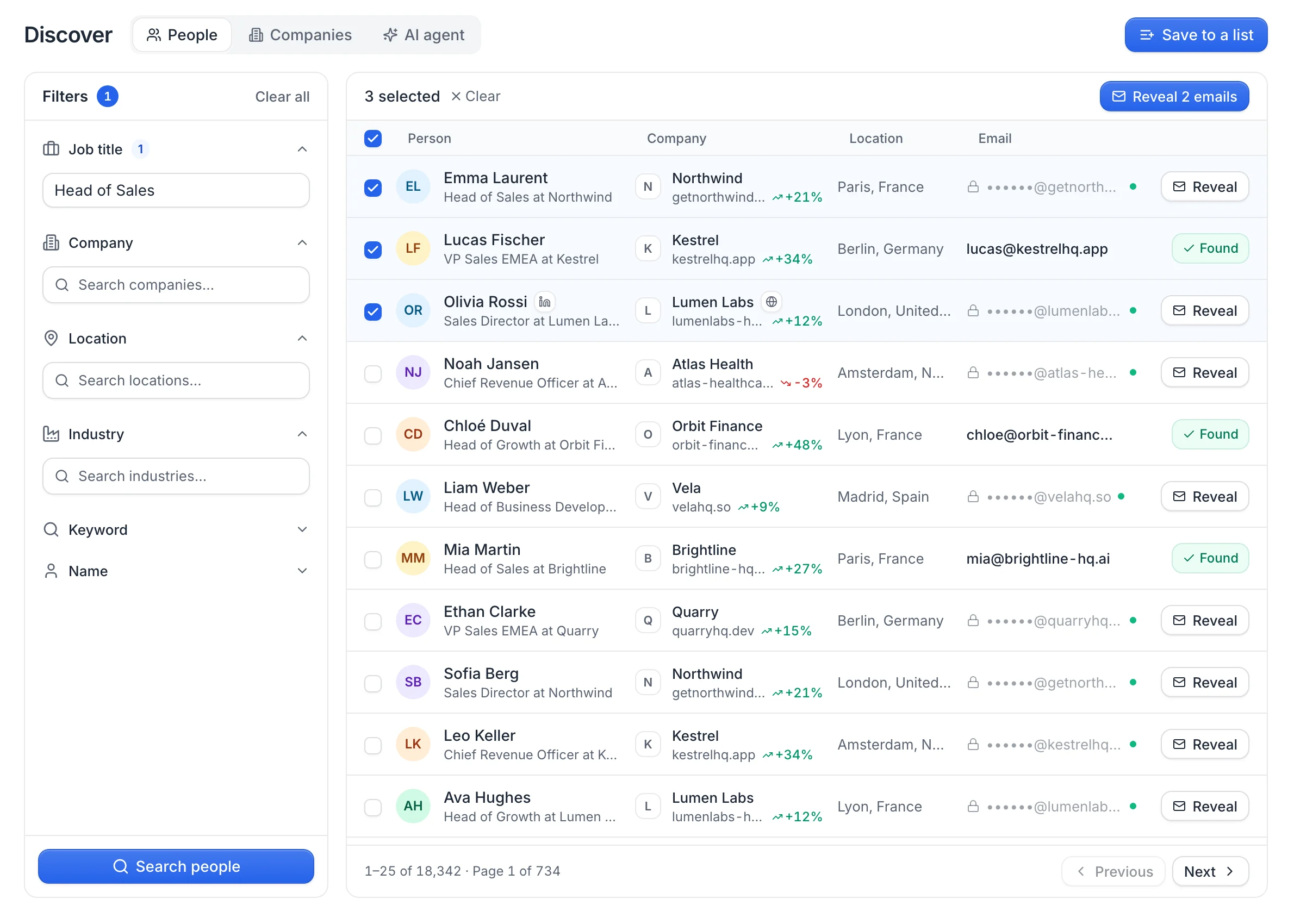
Lead finder
Find leads without a Sales Navigator search
Search millions of B2B people and companies by job title, company, location, industry or keyword, reveal their email in one click and save them to a list for your campaign.
- Filters for title, company, location, industry and keyword
- Searching is free, 1 credit per email found
- Or import LinkedIn, Sales Navigator and CSV lists
Kanbox: no lead database. Leads come from LinkedIn, Sales Navigator, Recruiter, posts, events or CSV files.
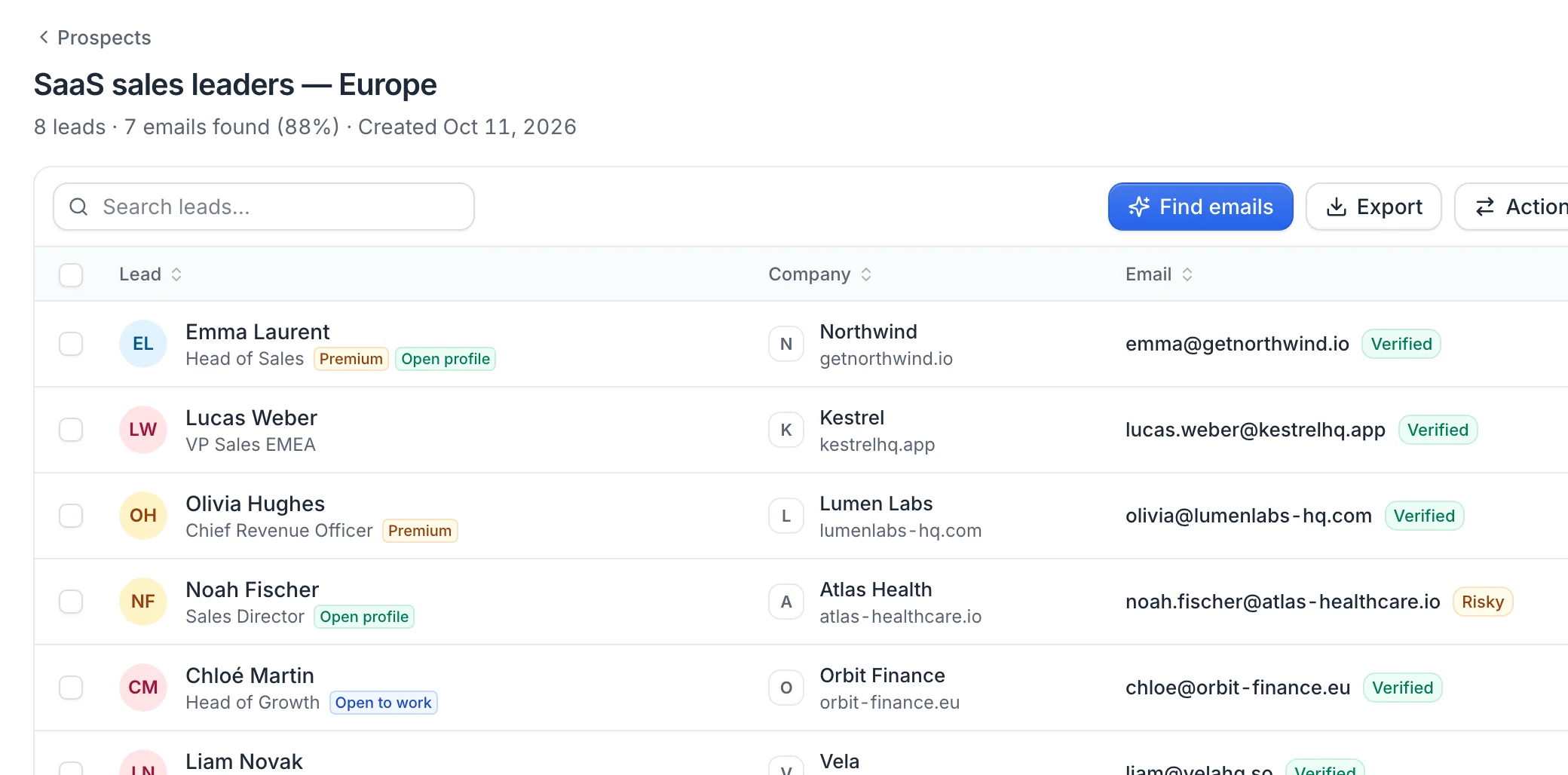
Verified emails
Verified emails included every month
Each plan includes email credits: 500 on Starter, 1,500 on Scale, 3,000 on Agency. The finder queries several data providers one after another and verifies each address before it reaches your list.
- Several data providers, one after another
- 1 credit per email found, none when nothing is found
- Each email marked verified, catch-all, risky or invalid
Kanbox: has an email finder with SMTP checks, and phone numbers too. Its credits are bought in packs and don't expire; ours come with the plan and carry over from month to month.
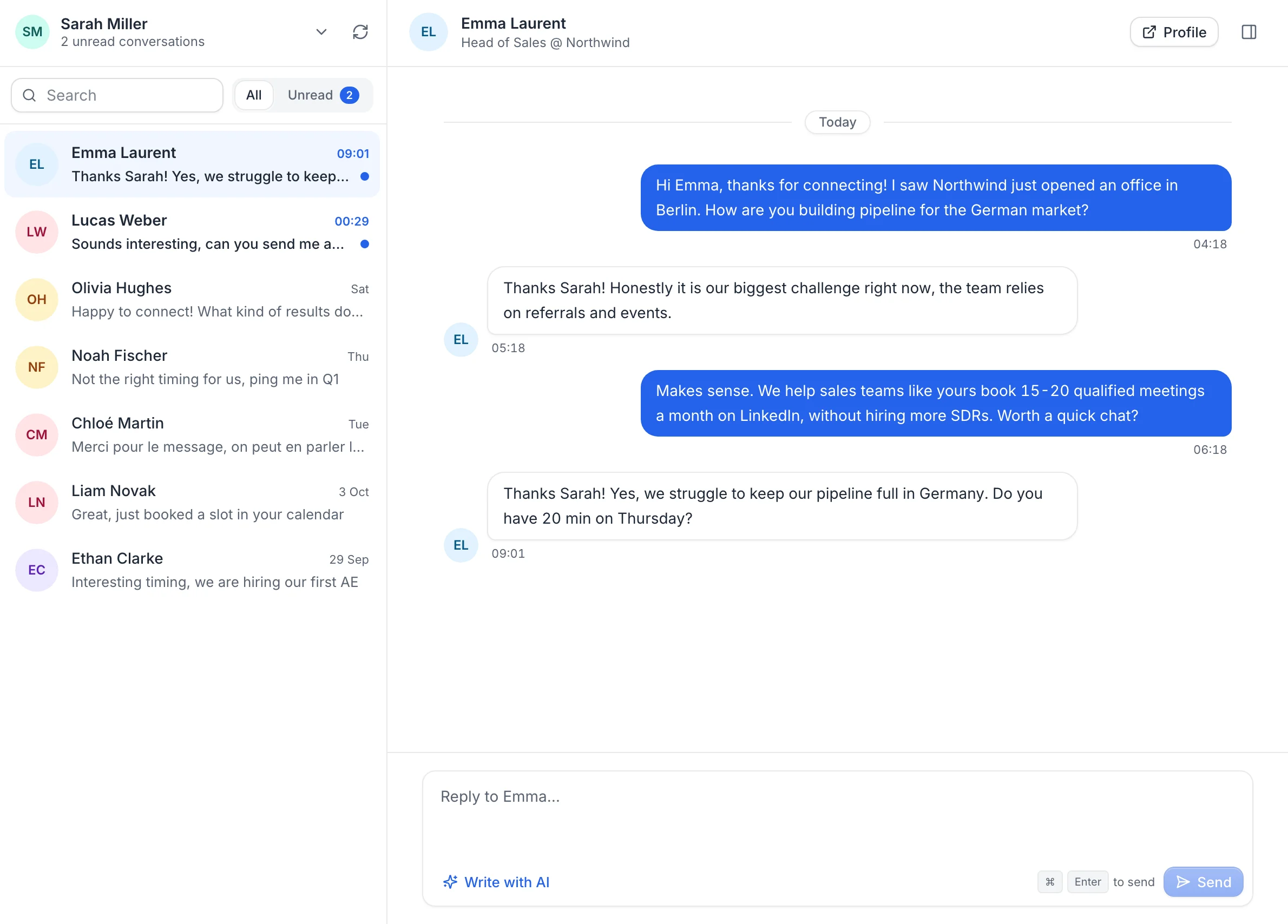
Inbox
Your replies and the lead's context in one place
Read and answer the LinkedIn conversations of your connected accounts, draft replies with AI, and see the lead's emails, campaigns and activity next to the chat.
- Conversations of every connected LinkedIn account
- Reply drafts written with AI
- The lead's emails, campaigns and activity next to the chat
Kanbox: goes further on inbox organization, with tags, notes, reminders and Kanban pipelines. If you run your deals from the LinkedIn inbox, that's its strength.
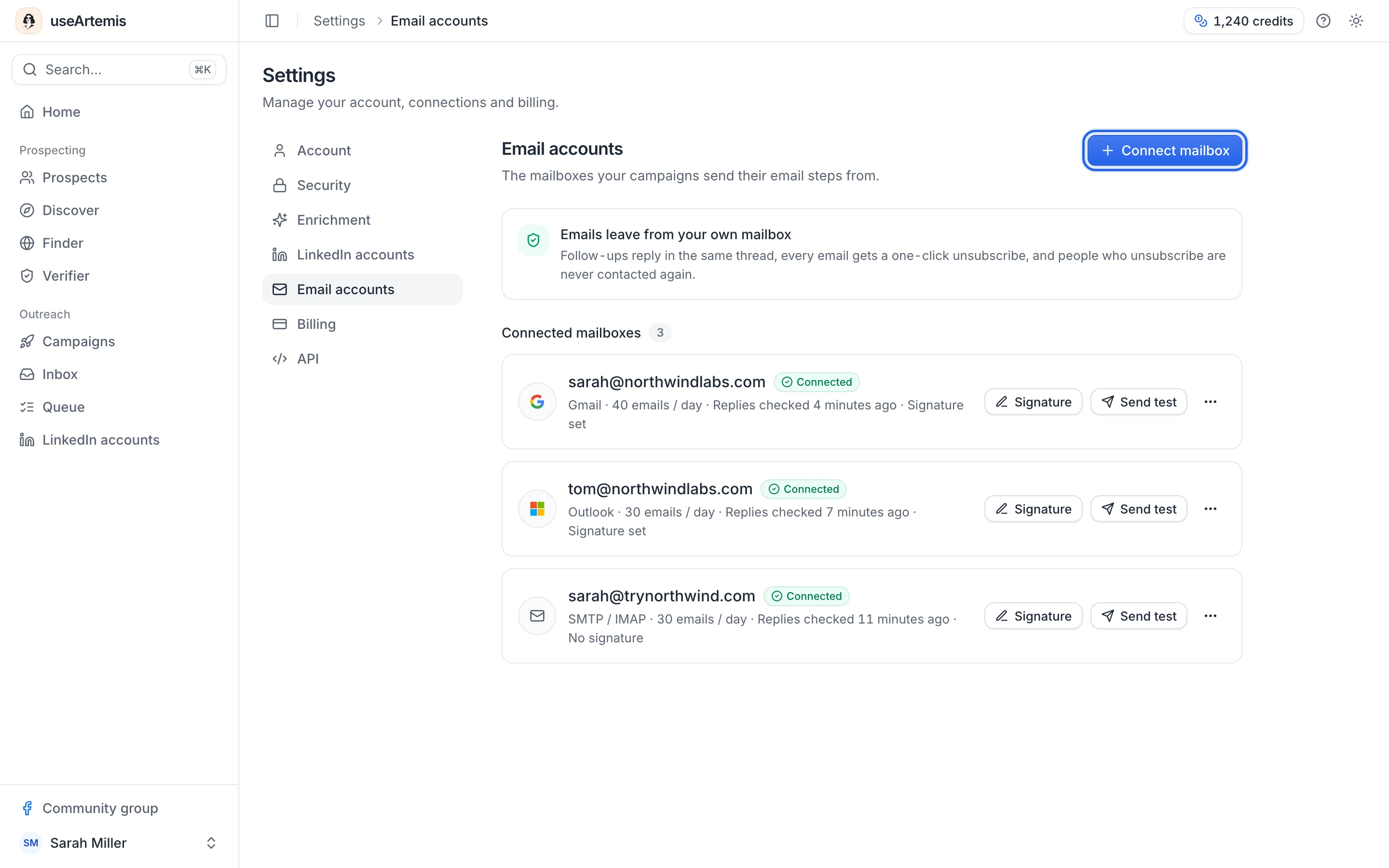
Switch in 10 minutes
Moving from Kanbox
Export your leads, connect LinkedIn and add an email step to the sequence you already know.
- 2 min
Create your account
Sign up for free (no credit card required) and prepare your lists and campaigns. You connect LinkedIn once you pick a plan.
- 1 min
Connect LinkedIn
Log in on LinkedIn's secure page. useArtemis doesn't store your LinkedIn password.
- 3 min
Bring your leads
Export your Kanbox lists to CSV and upload them, or find new leads in Discover.
- 4 min
Add an email step
Rebuild your LinkedIn steps, connect a mailbox and email the leads who don't accept.
Pause your Kanbox campaigns on an account before connecting it, so the two tools don't add up their daily LinkedIn actions.
Start switchingCustomers
Teams love useArtemis
“Best value lead tool on the market right now. I love using useArtemis to scrape LinkedIn: it saves me tons of time to find and verify email addresses.”
Kazuki O.Co-Founder, Markester · via G2“What I like best is its ease of use. The UX is intuitive and keeps improving. Knowing the team continues to improve the product is a great comfort.”
Jefferson T.Acquisitions & Development · via G2“Finding emails from just a LinkedIn profile URL is a big advantage. The accuracy is very good for the price, and the direct dials are a great bonus.”
Ankita T.Assistant Marketing Manager · via G2FAQ
Kanbox vs useArtemis: your questions
Can't find what you're looking for? Visit the help center.
More comparisons
Comparing other tools?

Reach your leads on LinkedIn and by email
Find leads in Discover, get their verified emails and contact them from one LinkedIn + email sequence. From $69 a month.