Plans and credits: what each plan includes
Compare the Starter, Scale and Agency plans, see what uses credits, how unused credits carry over and where to check your balance.
Updated October 27, 2026
useArtemis has three monthly plans: Starter, Scale and Agency. They all include LinkedIn and email sequences, AI-written messages, the lead finder and the inbox; they differ in volume. Credits pay for finding and verifying emails. Each monthly payment adds your plan's credits to your balance, and the credits you don't use carry over to the next month.
Plans
| Starter | Scale | Agency | |
|---|---|---|---|
| Price | $69 / month | $159 / month | $399 / month |
| LinkedIn accounts | 2 | 5 | 10 |
| Verified emails | 500 | 1,500 | 3,000 |
| Leads from Discover | 2,500 | 5,000 | 100,000 |
Every plan includes:
- LinkedIn invitations, messages, visits and likes,
- email steps in the same sequence,
- AI-written, personalized messages,
- the lead finder with verified emails,
- the inbox for every LinkedIn account,
- safe limits and a human-like pace.
Scale adds automatic AI replies, and Agency is built for multi-client outreach.
Prices are in USD, billed monthly through Paddle, by card or PayPal. You pay your first month when you subscribe, and you can cancel anytime. Compare the plans at https://useartemis.co/pricing.
Without a plan, you can use a free account: Discover, lists, CSV import, the AI agent and campaign drafts, with daily limits and no credits. See Free account: what's included.
Note: Need annual billing or more LinkedIn accounts? Email hello@useartemis.co.
AppSumo Lifetime is a separate, one-time deal with its own rules: see Redeem and stack your AppSumo code.
What uses credits
Credits are spent when you get an email:
- Finding an email: 1 credit per email found.
- Verifying an email: 1 credit per verification.
- Revealing a contact's email in Discover or with the AI agent: 1 credit, only when an email is found.
Searching in Discover, talking to the AI agent, saving results to a list, running campaigns and using the inbox don't use credits. When you're out of credits, actions that need one are refused (for example Not enough credits. You need at least 1 credit to reveal a contact.). See Find an email and Verify emails.
Unused credits carry over
Each time your monthly subscription payment goes through, your plan's monthly credits are added to your balance. The credits you didn't use stay on your account: with 120 credits left on Starter, your balance is 620 after the next payment. The date of the next payment is the Next payment date in Settings › Billing.
A few events also change your balance:
- Subscribing from a free account: your first payment adds your plan's monthly credits. A free account has no credits.
- Change of plan: the first payment of the new plan adds that plan's monthly credits to your balance. See Change your plan.
- Cancellation: your balance goes to 0 right away, unused credits included, and your account becomes a free account. See Cancel your subscription.
Check your balance
- In the header: the credits button at the top right of the app (for example 480 credits). Click it to open Settings › Billing.
- In the account menu: click your name at the bottom of the sidebar. Credits shows your balance and the credits your plan adds each month (for example 620 · +500/mo).
- In Settings › Billing: the Credits card shows the credits left. Get more credits opens the pricing page.
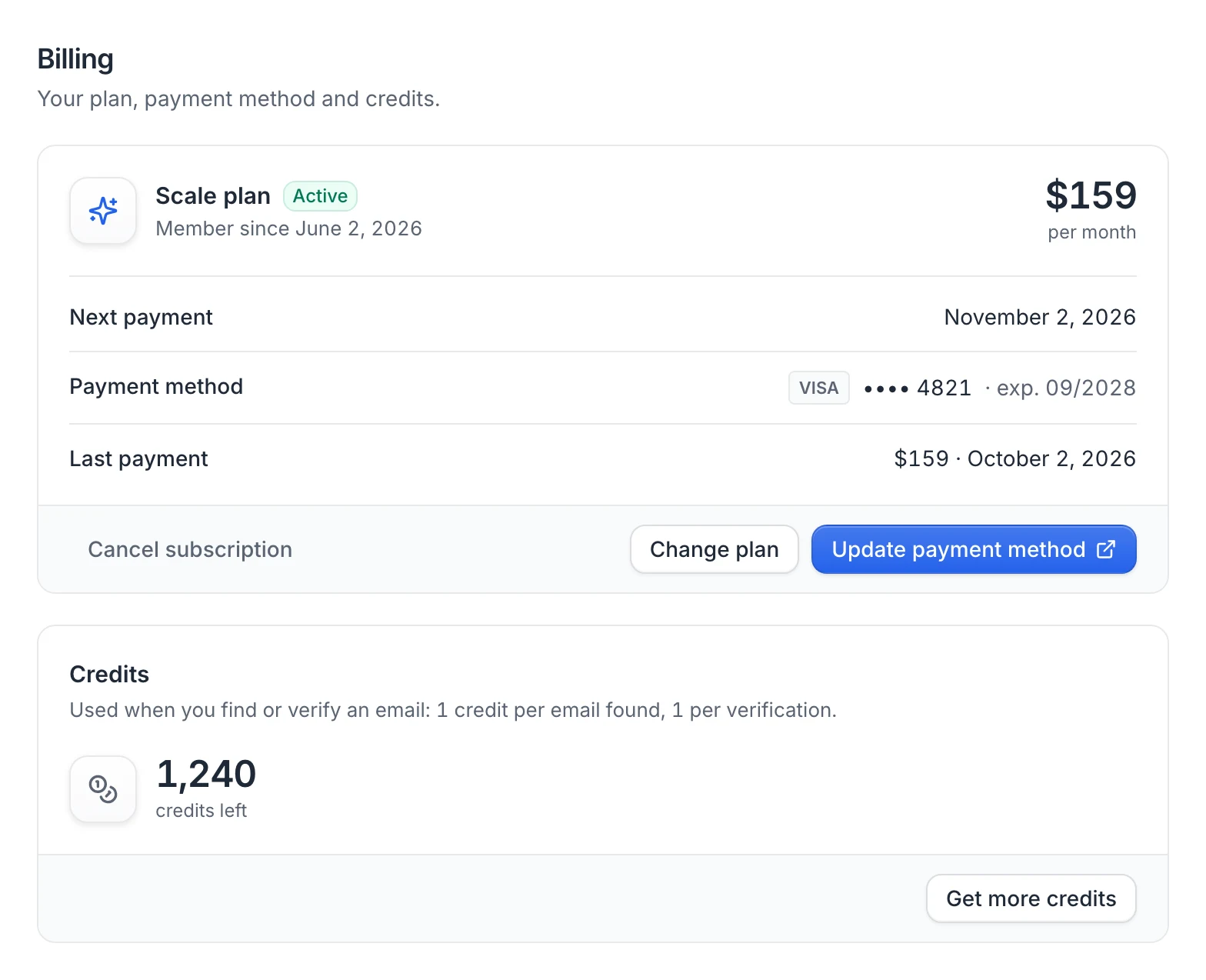
In a team workspace, the header shows the team's credits, and the account menu shows them as Team credits.
Tip: Running low before your next payment? Move to a bigger plan from Settings › Billing › Change plan.
FAQ
Do unused credits expire?
No, not while your subscription is active: on your billing date, your plan's monthly credits are added to the credits you have left. You can see the date under Next payment in Settings › Billing. Cancelling your subscription sets your balance to 0.
Do campaigns use credits?
No. LinkedIn and email steps don't use credits. Credits are only used to find, verify or reveal emails.
Can I buy extra credits without changing plan?
There's no credit top-up in the app. Get more credits takes you to the pricing page to pick a bigger plan.
Was this article helpful?
Related articles
Still need help?
Write to hello@useartemis.co with your account email and what you were trying to do.