Find emails at a company with the Finder
Type a company domain in the Finder to see who works there, their email addresses with a confidence score, and the company's email format.
Updated October 27, 2026
On this page
The Finder shows the people and email addresses behind a company domain. Type a domain such as company.com and you get the people we know there with their email and a confidence score, the company's most common email format and its generic addresses. Finder searches don't use credits.
Note: The Finder comes with a subscription. On a free account, a search opens the Subscribe to find emails window instead. See Free account: what's included.
Search a domain
- In the sidebar, under Prospecting, click Finder. The page is called Email finder.
- Type the company's domain in the box, for example
company.com. You can also paste the full website address:https://,www.and anything after the domain are removed. - Click Find emails.
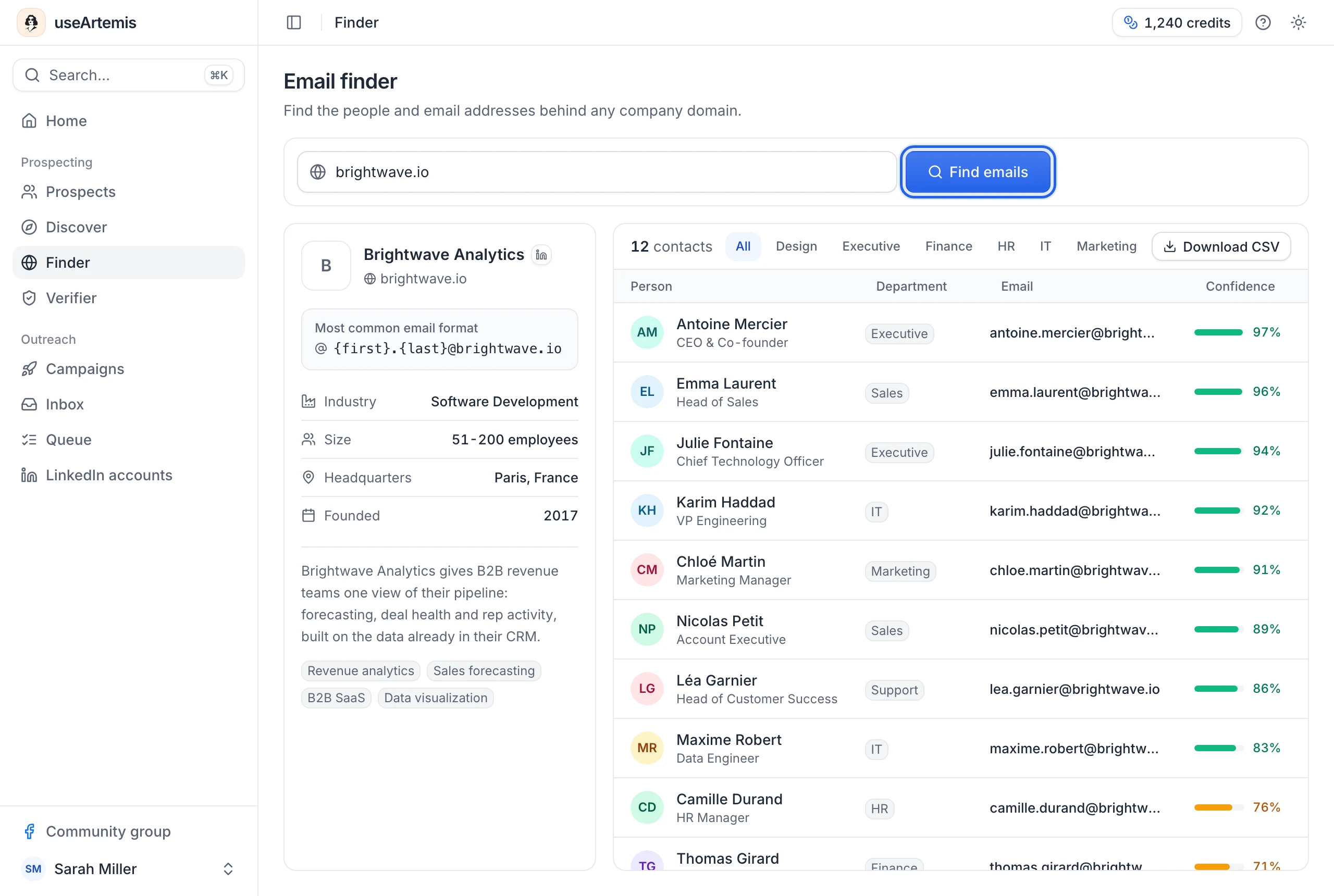
The first time, you can also click one of the example domains under "Try" to see what a result looks like.
A search can take a few seconds, because we query several data sources for the domain. Results are kept for 30 days: when the same domain is searched again within that time, they show right away.
Note: Type a domain, not a company name. If you only know the name, find the company's website first (or search the company in Discover).
Read the results
The company card
On large screens, a card on the left shows:
- the company's name, domain and LinkedIn page
- Most common email format: the pattern most addresses at this company follow, for example
{first}.{last}@company.com - Industry, Size, Headquarters and Founded, when known
- a short description and the company's specialties
The contacts
The table on the right lists the people found at the domain, with the number of contacts at the top. For each person:
- Person: name and job title. Hover the row for their LinkedIn or Twitter profile when available.
- Department: for example Sales, Marketing or IT.
- Email: the address. Hover the row and click the copy icon to copy it.
- Confidence: how likely the address is to be right, as a percentage with a colored bar. Green means high (80% and above), amber medium (50 to 79%), gray low (under 50%).
People are sorted by confidence, highest first. When the contacts belong to more than one department, buttons above the table (All and one per department) filter the list.
Below the table, Generic & role emails lists the company's shared addresses, such as contact@ or sales@.
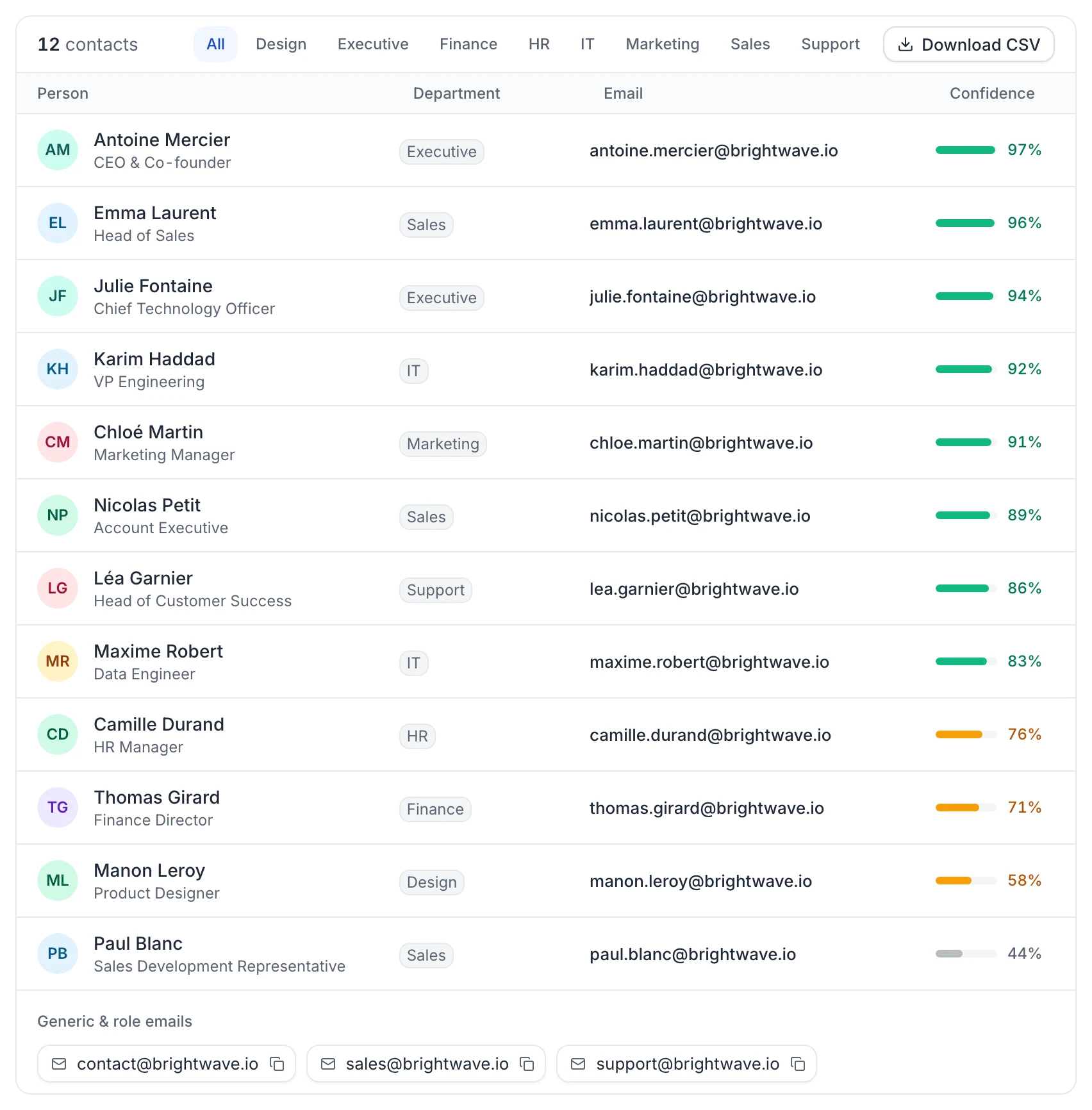
If nobody is listed, you see "No named contacts". The generic addresses, when there are some, are still shown below.
Tip: The confidence score is not a verification. Before you email someone, check the address in the Verifier (1 credit).
Download the results
Click Download CSV to save the contacts as a CSV file named after the domain. The file contains the name, first and last name, title, department, email, confidence and LinkedIn URL of each person, plus the generic addresses.
The file includes what's on screen: the current page of contacts and, if you filtered by department, only that department (generic addresses are then left out).
Use the contacts in a campaign
The Finder doesn't add contacts to a lead list directly. Download the CSV, then import it from Prospects › Import leads › Upload a CSV file and map the columns, including the email column as Email. See Import leads from a CSV file.
Note: The import needs either Firstname, Lastname and Company name, or LinkedIn URL. The Finder file has no company column, so map the linkedin_url column, or add a company column to the file before importing.
Find a person who isn't listed
The Finder only lists people our data sources have an address for. For anyone else at the company:
- Write their likely address with the Most common email format (for example
jane.doe@company.com). - Check it in the Verifier.
You can also search the company's people in Discover and reveal their email there.
FAQ
Does the Finder use credits?
No. Searching a domain and downloading the CSV are free.
I searched a domain again and nothing changed. Why?
Results for a domain are kept for 30 days, so a new search within that time shows the same contacts. They're refreshed after 30 days.
Why are no contacts listed?
We couldn't find people or addresses for this domain. Check the spelling (for example .com versus .io), and make sure you typed the domain the company uses for email, which can differ from its website.
Are the Finder emails verified?
No. The confidence score tells you how likely each address is, but it's not a mailbox check. Use the Verifier before sending to an address you're unsure about.
Was this article helpful?
Related articles
Still need help?
Write to hello@useartemis.co with your account email and what you were trying to do.