Verify email addresses
Check one address or paste up to 50 in the Verifier to see if they're valid, risky, invalid or unknown before you send. Each check uses 1 credit.
Updated October 27, 2026
On this page
The Verifier checks whether an email address exists and can receive emails, so your campaigns don't bounce. Check one address or paste a list of up to 50. Each address checked uses 1 credit.
Note: The Verifier comes with a subscription. On a free account, checking an address opens the Subscribe to find emails window instead. See Free account: what's included.
Verify one address
- In the sidebar, under Prospecting, click Verifier. The page is called Email verifier.
- Stay on the Single email tab and type the address (for example
name@company.com). - Click Verify.
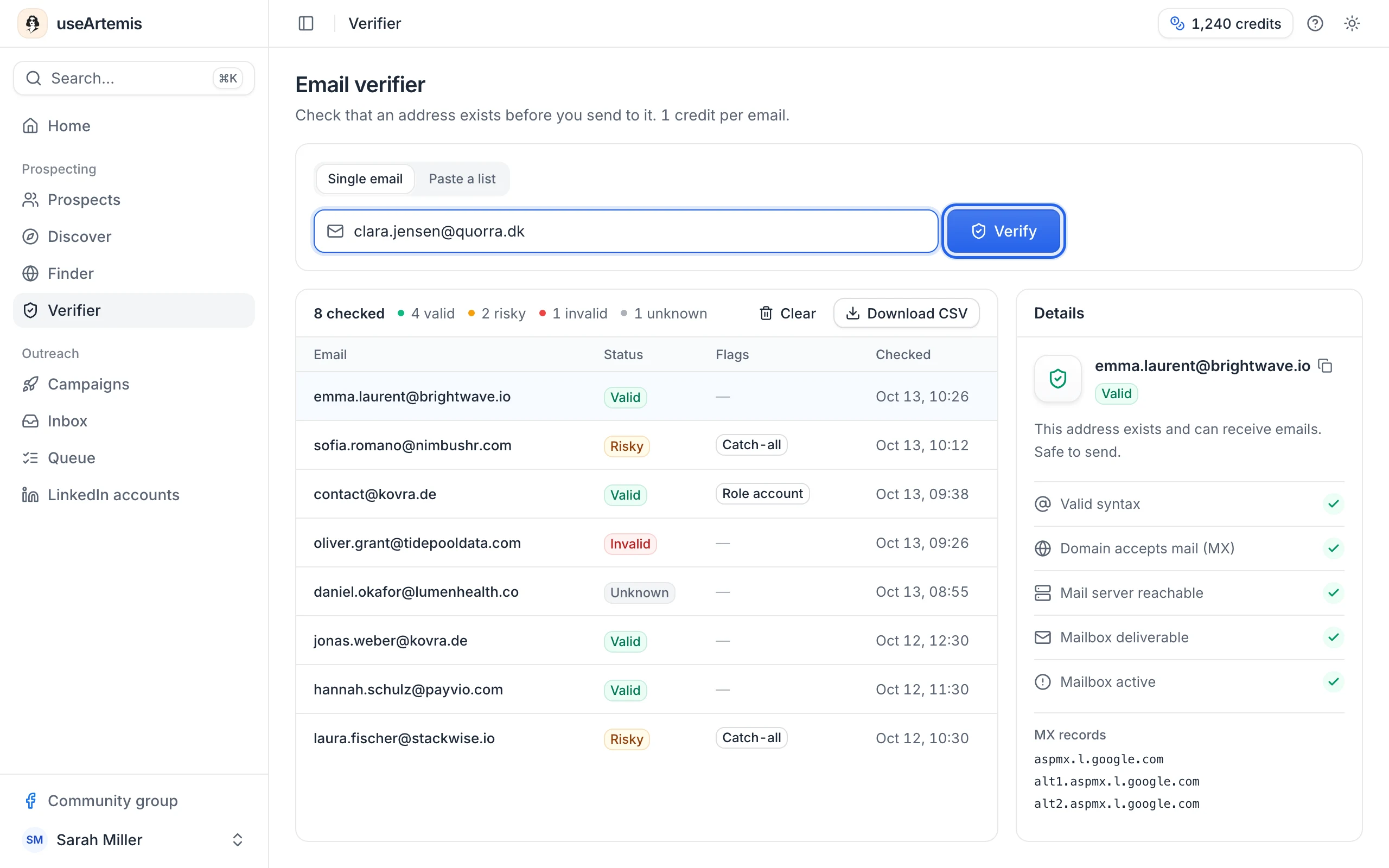
The check takes a few seconds while we contact the mail server ("Checking the mail server…"). The result appears in the table below.
Verify a list of addresses
- Click the Paste a list tab.
- Paste up to 50 addresses, one per line or separated by commas. You can paste a column from a spreadsheet or any text: we pick out the email addresses and remove duplicates. The counter under the box shows how many addresses were detected.
- Click Verify N emails · N credits.
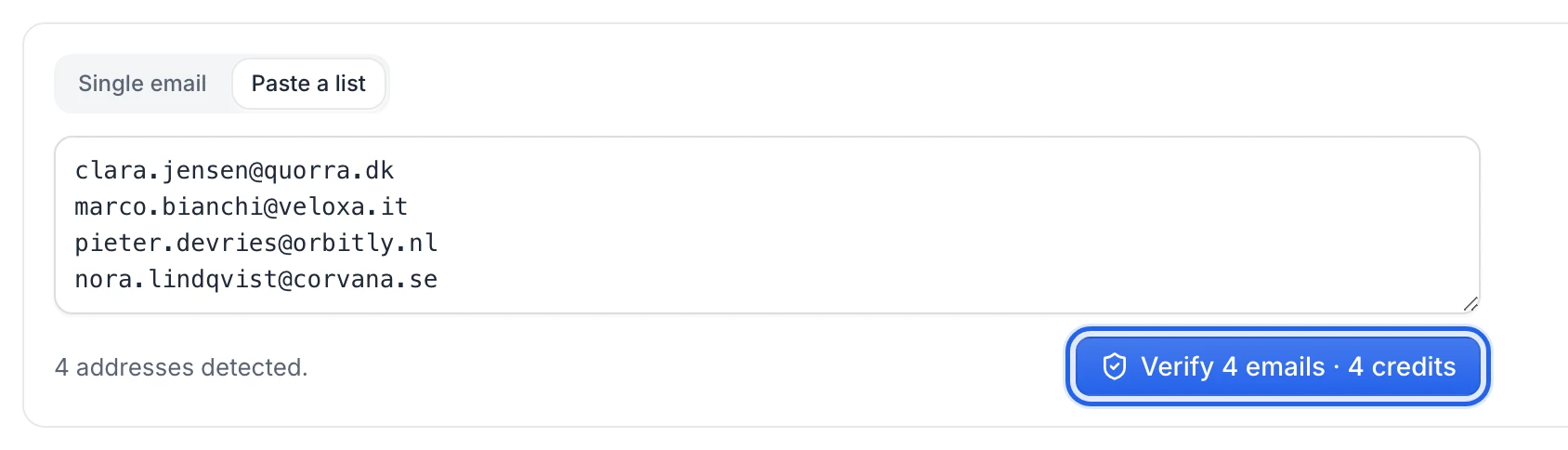
Addresses are checked one after the other and the button shows the progress ("Verifying 12/50…"). If you paste more than 50 addresses, only the first 50 are checked. If you run out of credits, the run stops and you see "Not enough credits".
Tip: To verify more than 50 addresses, paste them in batches of 50.
Read the results
The table lists every address you've checked, newest first, with the count per status at the top. For each address:
- Email: hover the row and click the copy icon to copy it.
- Status: Valid, Risky, Invalid or Unknown.
- Flags: Catch-all, Disposable or Role account, when they apply.
- Checked: the date and time of the check.
| Status | What it means | Send? |
|---|---|---|
| Valid | This address exists and can receive emails. | Yes |
| Risky | The address might exist but couldn't be fully confirmed (catch-all domain, full mailbox or temporary error). | With care |
| Invalid | This address doesn't exist or can't receive emails. It would bounce. | No |
| Unknown | The mail server didn't give a clear answer. | Try again later |
The flags:
- Catch-all: the domain accepts mail for any address, so the mailbox itself can't be confirmed. A catch-all address that's accepted is marked Risky.
- Disposable: a temporary email service. These addresses are marked Invalid.
- Role account: a shared address such as contact@, sales@, info@ or support@. These addresses are marked Risky: they rarely reach a decision-maker.
More on statuses, including the ones shown in your lead lists: What email statuses mean.
See the details of a check
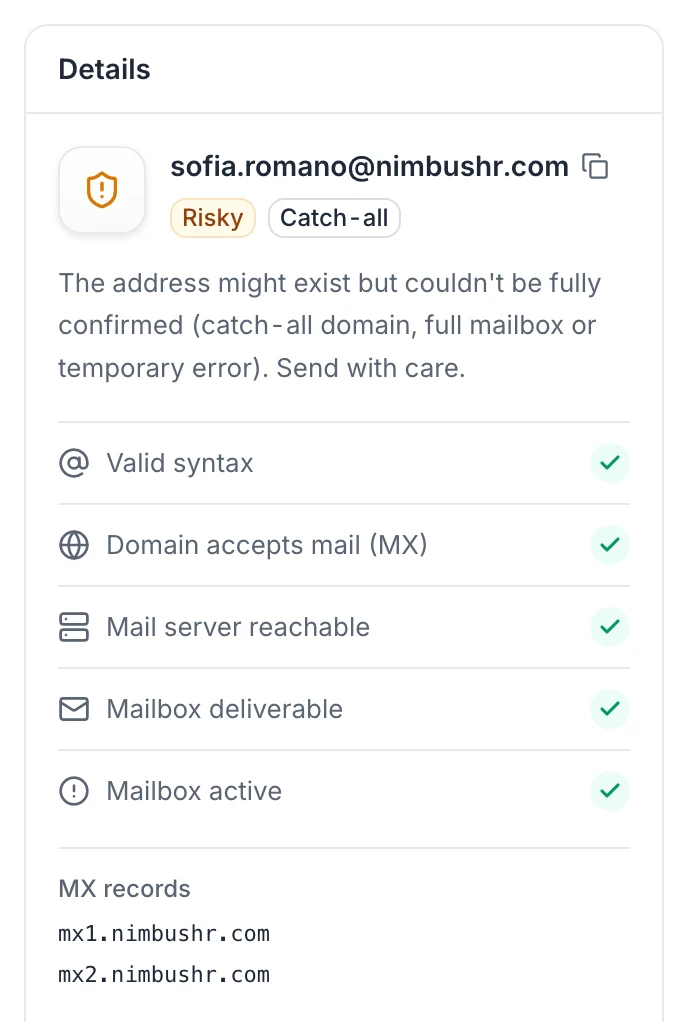
On large screens, click an address to see its Details panel: the status with a short explanation and each step of the check.
- Valid syntax: the address is correctly written.
- Domain accepts mail (MX): the domain has mail servers.
- Mail server reachable: we could connect to the mail server.
- Mailbox deliverable: the server accepted this mailbox.
- Mailbox active: the mailbox isn't disabled.
The panel also lists the domain's MX records (its mail servers).
Download or clear your results
- Download CSV saves all the results in the table, with the email, status, catch-all, disposable and role account columns and the date of the check.
- Clear empties the table. It doesn't give credits back.
Your results are kept in this browser, for your account (or for the team, in a team workspace), up to the last 200 addresses. They aren't visible from another browser or computer, so download the CSV if you need to keep them.
Credits
Each address checked uses 1 credit, whatever the result, including Invalid and Unknown. Checking the same address again uses another credit and replaces its previous result. If a check fails with an error ("Couldn't verify…"), no credit is used.
You need at least 1 credit to verify. In a team workspace, the team's credits are used. See What uses email credits.
Free checks on the useArtemis website
You can also check one address at a time, for free, with the free email verifier on our website. It runs the same check as the Verifier in the app.
- Who can use it: anyone with a useArtemis account, logged in. No plan is needed (AppSumo accounts included). If you aren't logged in, clicking Verify asks you to create a free account or log in; the address you typed stays in the box and is checked as soon as you're logged in.
- 10 free checks a day per account. They don't use credits. The counter resets every day at midnight UTC, and the page shows how many free checks you have left today. Free checks are also limited per network, to stop abuse.
- One address at a time. To check a list, use the Verifier in the app (up to 50 addresses at a time, 1 credit each).
- What isn't counted: an address that isn't written correctly (it's marked Invalid right away) and a check that couldn't run ("We couldn't verify this address").
- Nothing is stored: the addresses you check aren't saved in your account. We only keep a daily count of your free checks, without the addresses, deleted within two days.
Each check ends with one of five results. The website shows Catch-all as its own result, where the app shows Risky with a Catch-all flag.
| Result | What it means |
|---|---|
| Valid | The mail server confirmed that the mailbox exists. |
| Risky | The mailbox exists, but it's a disposable or role address, or the server reported a problem such as a full mailbox. |
| Catch-all | The domain accepts every address, so this mailbox can't be confirmed. |
| Invalid | The mailbox doesn't exist or is disabled, the domain has no mail server, or the address is badly written. |
| Unknown | The mail server didn't give a clear answer. Try again later. |
Under the result, the page lists each check: syntax, domain accepts email (MX), mailbox exists, catch-all domain, disposable address and role address.
When you've used your 10 free checks, the page tells you when they come back and links to the Verifier in the app.
FAQ
An address is Unknown. Should I verify it again?
Yes, later. Some mail servers don't answer verification requests right away or reject them temporarily. Note that each new check uses a credit.
An address is Risky because of a catch-all domain. Can I send to it?
You can, with care: the domain accepts every address, so we can't tell if this mailbox exists. Prefer sending to Valid addresses first, and keep risky ones to small volumes.
Can I verify all the emails of a lead list?
The Verifier works with addresses you type or paste, up to 50 at a time. Emails found with Find emails on a list already come with a status. See What email statuses mean.
Was this article helpful?
Related articles
Still need help?
Write to hello@useartemis.co with your account email and what you were trying to do.