LinkedIn sending limits and safe volumes
Daily and weekly limits per LinkedIn account, defaults and maximums, campaign caps, the warm-up of new accounts, working hours and invitation note length.
Updated October 27, 2026
On this page
Every LinkedIn account has its own daily and weekly limits, shared by all the campaigns that use it. New accounts start at 25 invitations a day and 100 a week. useArtemis spreads the actions over your working hours and slows down newly connected accounts automatically. You can change the limits from the account card on LinkedIn accounts.
Default and maximum limits per account
| Limit | Default | Maximum |
|---|---|---|
| Connection requests per day | 25 | 100 |
| Messages per day (voice notes included) | 60 | 150 |
| Profile visits per day | 80 | 150 |
| Post likes per day | 40 | 100 |
| Connection requests per week | 100 | 200 |
Withdrawing pending invitations has a fixed cap of 50 per day per account.
These caps apply to the account, not to a campaign: if two campaigns use the same account, they share its 25 daily invitations.
Change the limits of an account
Go to LinkedIn accounts.
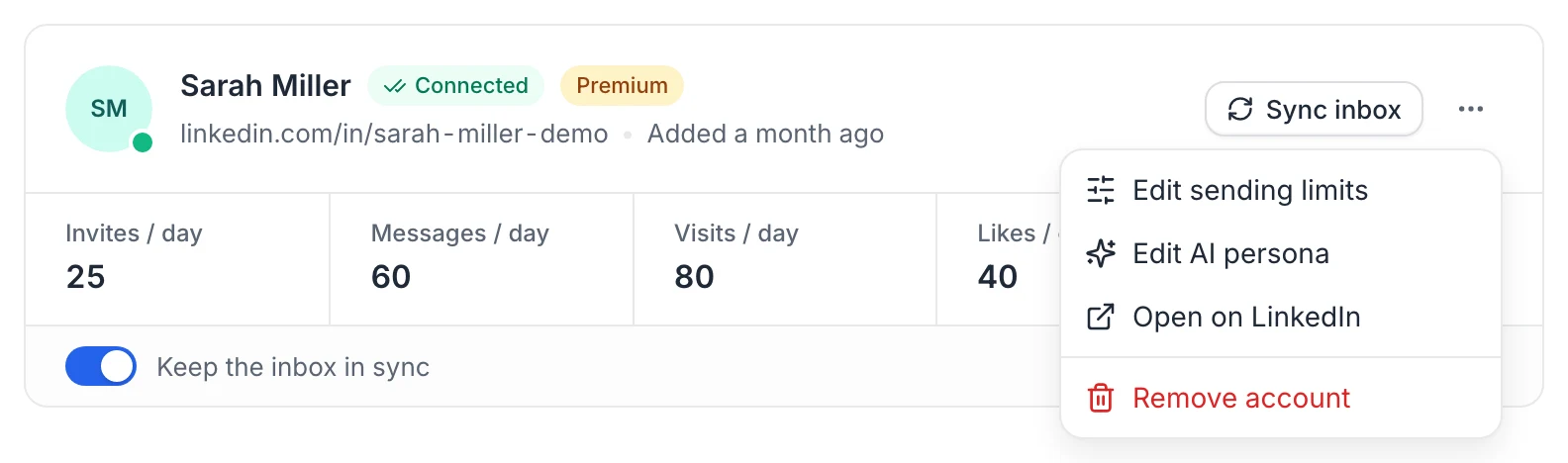
On the account card, click the limits row (Invites / day, Messages / day…), or open the ⋯ menu and choose Edit sending limits.
In Sending limits, enter the new values. Each field shows its maximum (Max 100, Max 150…).
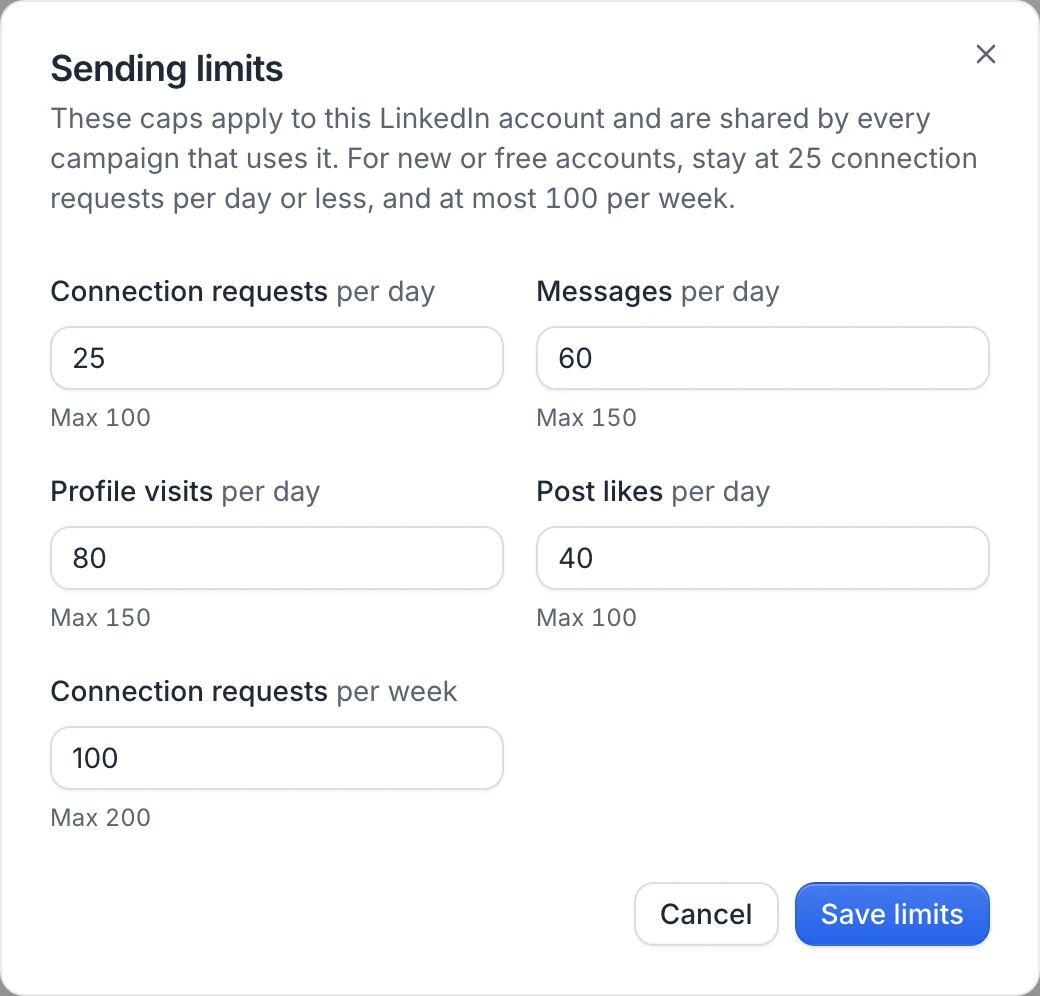
Click Save limits. The new limits apply right away.
If you go above 25 connection requests per day or 100 per week, the dialog warns: Above the recommended volume. Higher limits increase the risk of LinkedIn restricting the account, so only raise them for well-established or Premium accounts.
Campaign limits
Each campaign also has its own daily caps, in the campaign's settings (the gear icon Campaign settings at the top of the campaign, LinkedIn › Daily limits of this campaign):
| Campaign setting | Default | Maximum |
|---|---|---|
| Profile visits | 80 | 150 |
| Connection requests | 30 | 100 |
| Messages | 50 | 150 |
An action only runs when both the campaign cap and the account cap have room left. In practice, the lower of the two wins: under each campaign limit, the settings show what your sending accounts allow in total ("Your 2 accounts allow 45 a day."), in amber when the campaign limit is higher. Click Save settings after a change.
Warm-up of newly connected accounts
During its first two weeks in useArtemis, an account runs below its daily limits, to avoid a sudden jump in activity:
| Time since the account was added | Daily limits used |
|---|---|
| First 3 days | 40% |
| Days 3 to 7 | 60% |
| Days 7 to 14 | 80% |
| After 14 days | 100% |
For example, with the default 25 invitations a day, a brand-new account sends up to 10 invitations a day at first. The card shows the limits you set, not the reduced ones. Reconnecting an account doesn't restart its warm-up.
On a free account
Connecting LinkedIn and sending come with a subscription, so no LinkedIn account sends from a free account. Subscribe to connect your account; the warm-up then applies as above. See Free account: what's included.
Working hours and pacing
- LinkedIn actions only run inside the campaign's Working hours (9h to 18h by default), in the campaign's Timezone.
- With Days set to Monday to Friday (the default), nothing is sent on Saturdays and Sundays.
- Within the day, actions are spread out with random gaps instead of being sent in a burst. For example, for an account past its warm-up with 25 invitations a day between 9h and 18h, an invitation goes out roughly every 12 to 27 minutes.
- Days and weeks (Monday to Sunday) are counted in the campaign's timezone. When a limit is reached, the next actions wait for the next working day or week.
- Leads waiting on the same limit are lined up: first messages to leads who just accepted come first, then follow-ups, then new visits and invitations.
See Schedule your campaign to change working hours and timezone.
When LinkedIn pushes back
- LinkedIn says a limit is reached: useArtemis stops that type of action (for example invitations) on this account for 24 hours, then resumes. Other action types keep running.
- A free account runs out of invitations with a note: the invitation goes out right away without the note, and the next invitations from this account skip the note until the 1st of next month. Invitations don't stop. The lead's activity says "Sent without a note: this free LinkedIn account has used its invitations with a note for this month". On a Premium account, the same refusal is treated as a limit (above).
- LinkedIn disconnects or restricts the account: the account's steps wait and you're asked to reconnect it. See Fix a disconnected LinkedIn account.
LinkedIn's own rules
- Invitation notes: up to 300 characters with LinkedIn Premium, 200 with a free account. The invitation step shows a counter (… / 300, or … / 200 when the sending account isn't Premium) and warns you when a note is too long for the account. Longer notes are shortened at the end of a sentence or a word, and notes written by AI are written to fit.
- Notes on free accounts: LinkedIn lets a free account send only a few invitations with a note each month (about 5), but around 150 a week without a note. The invitation step reminds you of it. When the notes are used up, useArtemis keeps inviting without a note until the next month (see above), so the campaign doesn't stall. With a free account, consider sending invitations without a note from the start.
- Message length: LinkedIn accepts messages of up to 8,000 characters. A longer message, once its variables are filled in, is shortened at the end of a sentence or a word.
- Messages only reach 1st-degree connections. A message to a lead who hasn't accepted your invitation fails with Not connected with this lead yet. Add a Wait for… › Accepted invite step before your messages.
- Withdrawn invitations: after you withdraw an invitation, LinkedIn blocks a new one to the same person for about three weeks.
- Profile visits are real visits: the lead can see you in "Who viewed your profile".
Recommendations
- Keep new or free accounts at 25 connection requests per day or less, and 100 per week at most.
- Raise limits gradually, and only on accounts with a long, normal LinkedIn history.
- Keep realistic working hours and leave weekends off.
- Clean up invitations that stay pending with a Withdraw request step.
- Need more volume? Connect more accounts and rotate between them instead of pushing one account.
FAQ
Why did my campaign send fewer actions than my limit?
Usually one of these: the account is still in its warm-up, the campaign cap is lower than the account cap, another campaign used part of the account's limit, the working hours were over, or no lead was ready for that step yet.
Do limits apply per campaign or per account?
Both. The account limits are shared by all campaigns using the account. Each campaign also has its own caps.
When does the weekly invitation limit reset?
On Monday, in the campaign's timezone.
Was this article helpful?
Related articles
Still need help?
Write to hello@useartemis.co with your account email and what you were trying to do.