Export a lead list to CSV
Download a lead list as a CSV file, with every lead or only verified emails, and see which columns the exported file contains.
Updated October 13, 2026
On this page
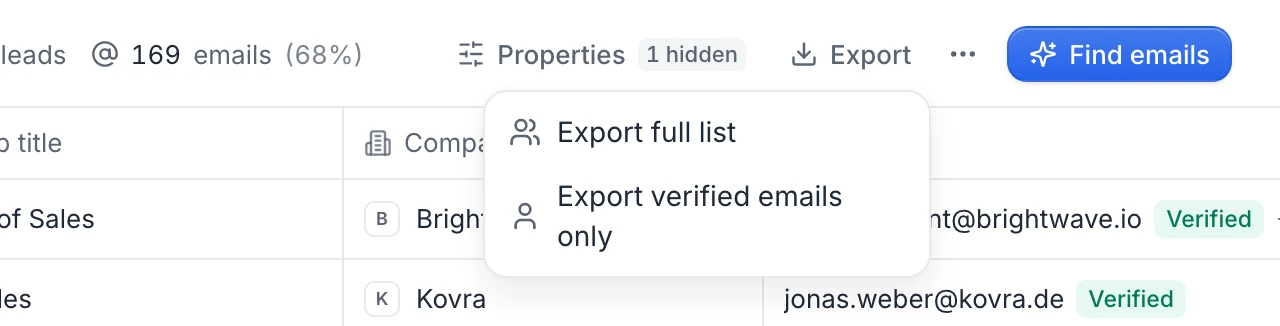
Open the list, click Export in the toolbar, then Export full list or Export verified emails only. A CSV file named after the list downloads right away. You can open it in Excel, Google Sheets or import it into your CRM.
Export a list
- Click Prospects in the sidebar and open the list.
- Click Export at the top right of the table (next to Properties).
- Choose:
- Export full list: every lead of the list.
- Export verified emails only: only the leads whose work email is Verified.
The export always contains the whole list: your search, sorting, hidden columns and selected rows don't change what's in the file. Exporting doesn't use credits.
Columns in the file
| Column | Content |
|---|---|
| Name | Full name |
| Firstname, Lastname | First and last name (taken from the full name when they're empty) |
| JobTitle | Job title |
| Work_email | The lead's work email |
| verification | Verification result of that work email (for example Safe for a verified address, Risky) |
| Emails | Every email address saved on the lead, separated by commas |
| Phone | Phone number |
| Company | Company name |
| company_size, company_hq, company_linkedin_url, company_description, company_type, company_founded | Company details, when known |
| Website | Company website |
| Industry | Industry, when known |
| Location | The lead's location |
| LinkedIn profile URL | |
| facebook, twitter | Social profiles |
| isOpen, jobSeeker, isPremium | LinkedIn open profile, open to work and Premium flags, when known |
Custom properties, enrichment columns, tech stack, SEO data and Instagram profiles aren't part of the export.
Note: Emails found with Find emails are listed in the Emails column only: they don't fill Work_email and verification, and Export verified emails only leaves them out. Leads searched without result show not found in Emails. To keep only the emails you want, filter the Emails column in your spreadsheet, or check the status tags in the list before you export.
FAQ
Can I export only some leads?
Not directly: an export always covers the whole list. Select the leads you want, use Move to to put them in a separate list, and export that list. See Move leads to another list.
Can I export my custom properties?
No, custom properties aren't included in the CSV file today. You can see them as columns in the list and in each lead's panel. See View and edit a lead.
Why is my verified-only file empty?
The verified-only export keeps leads whose Work_email is verified. Emails found with Find emails aren't counted as work emails in the export (see the note above), so a list enriched that way can give an empty file. Use Export full list instead.
Was this article helpful?
Related articles
Still need help?
Write to hello@useartemis.co with your account email and what you were trying to do.