Will Someone Know If I View Their LinkedIn Profile Without Logging In?
Samuel Rondot
7 min read
On this page
- Why a logged-out visit stays invisible
- The mistake that gives you away: you're still logged in
- How to view a LinkedIn profile without logging in
- What you can see on LinkedIn without an account
- Can you see who viewed your LinkedIn if they don't have an account?
- Need the full profile? Stay signed in and use private mode
- What about "anonymous LinkedIn viewer" tools and fake accounts?
- How to find someone's LinkedIn profile ethically (without their email)
- FAQ
No, they won't know. If you open someone's LinkedIn profile while you're signed out, or without having an account at all, the visit isn't attached to any LinkedIn member. It can't appear in their Who's Viewed Your Profile list and no "viewed your profile" notification goes out. The catch: you only see the public version of the profile (often behind a "Sign in to view the full profile" pop-up), and if you're still logged in to LinkedIn in that browser or in the app, the visit counts as yours.
Here's why it works, the mistakes that give people away, and how to look someone up cleanly.
Why a logged-out visit stays invisible
LinkedIn's Who's Viewed Your Profile feature is built on members and their privacy settings. When a signed-in member opens your profile, LinkedIn shows them to you according to their profile viewing setting: name and headline, a vague description such as "Someone at Accenture", or an anonymous "LinkedIn Member" (LinkedIn Help).
A visitor who isn't signed in has no member profile behind them. There's no name, job title or company for LinkedIn to display, so nothing shows up on the other side. That's true whether you came from Google, typed the URL or clicked a link someone sent you.
| How you opened the profile | What the profile owner can see |
|---|---|
| Not signed in, or no LinkedIn account | Nothing that identifies you |
| Signed in, viewing option "Your name and headline" | Your name, headline, location and industry |
| Signed in, "Private profile characteristics" | A description such as "Someone at Accenture" or "Student at Cornell University" |
| Signed in, "Private mode" | "LinkedIn Member – This person is viewing profiles in private mode" |
Whether the owner actually sees a signed-in visitor's name also depends on their own account. A free (Basic) account shows the three most recent viewers from the last 90 days, while Premium shows the full list (LinkedIn Help). Our guide on whether LinkedIn shows who viewed your profile covers that side in detail.
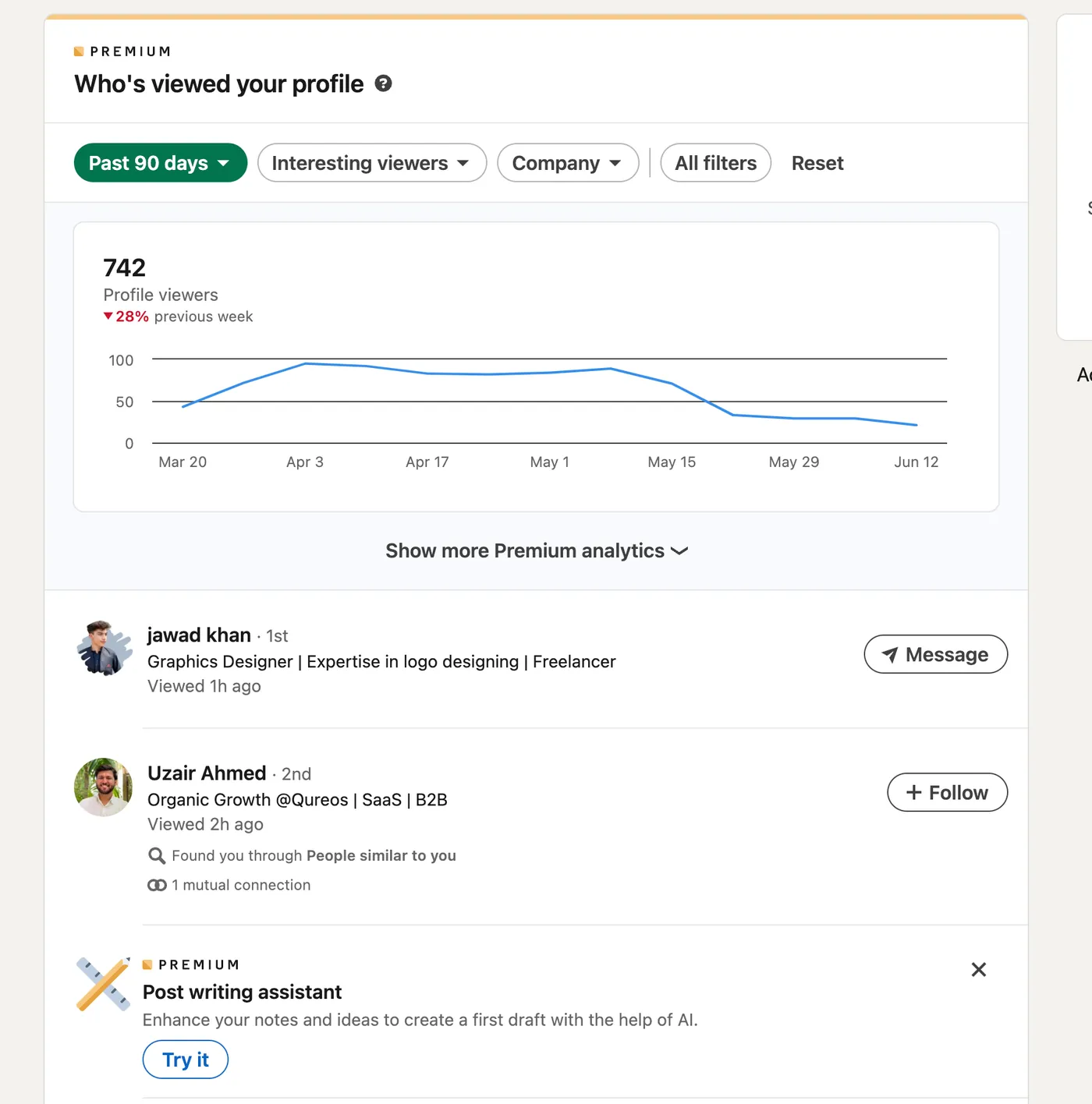
The mistake that gives you away: you're still logged in
Most people who "got caught" weren't logged out at all. Watch for these four situations:
- Clicking a Google result in your usual browser. If you're signed in to LinkedIn in that browser, the profile opens with your session and the view is recorded under your account, with whatever viewing setting you use. Coming from Google changes nothing.
- Opening the profile in the LinkedIn app. The app keeps you signed in, so every profile you open there is a member view.
- Clicking a name in LinkedIn's search suggestions. Selecting a member in the search bar's suggestions opens a mini profile that LinkedIn treats as a profile view, which can trigger a notification (LinkedIn Help).
- Signing in when the sign-in wall pops up. The moment you log in to read the full profile, you're a member viewer again.
The fix is simple: use a private (incognito) browser window where you're not signed in, or switch LinkedIn to private mode before you start browsing.
Don't confuse the two. Browser incognito only hides you because you're signed out in that window. LinkedIn's private mode keeps you signed in but hides your identity from the people you look at.
How to view a LinkedIn profile without logging in
1. Search for the person on Google, Bing or DuckDuckGo
LinkedIn public profiles appear in search engines (LinkedIn Help). Search the person's name with their company or city and the word "LinkedIn". When the name is common, an X-ray search narrows results to profile pages only:
site:linkedin.com/in "Jane Doe" "Acme"
Our LinkedIn X-ray search guide lists more operators to find people by job title, company or location, all without a LinkedIn account.
2. Open the profile URL in a private window
If you already have the link (from an email signature, a website or a résumé), paste it into a private/incognito window. That's exactly what a signed-out visitor gets.
3. Expect a sign-in wall
LinkedIn may ask people who aren't members to sign up or sign in before showing parts of a public profile (LinkedIn Help). In practice you get a pop-up like this one, with part of the profile visible behind it:
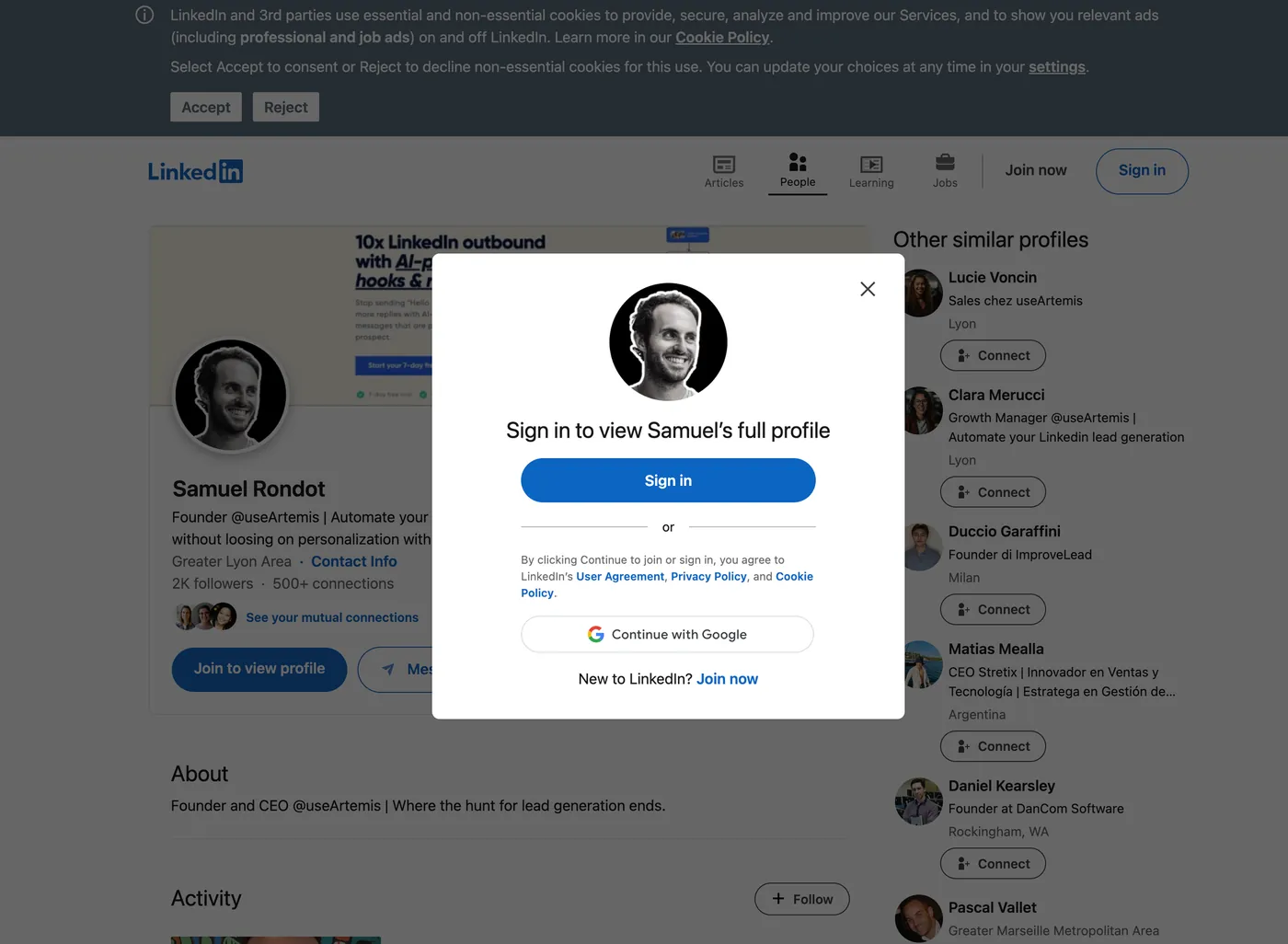
Closing the pop-up often leaves the public sections readable. If you sign in instead, you're no longer anonymous.
What you can see on LinkedIn without an account
A logged-out visitor sees the person's public profile: a simplified version of their LinkedIn profile whose sections the owner chooses (LinkedIn Help).
| Often visible when logged out (if the owner allows it) | Not visible when logged out |
|---|---|
| Name, headline, region, current company and school | Contact info (reserved for 1st-degree connections) |
| Profile photo (public by default) | Skill endorsements and rich media work samples |
| About, experience and education sections left public | Their connections and your mutual connections |
| Some posts and activity, if the owner enabled it | Messaging, connecting, any Who's Viewed data |
Some profiles won't show up at all. Members can switch Your profile's public visibility off, which hides them from search engines and signed-out visitors, and LinkedIn sometimes shows an even shorter preview than the owner allowed (LinkedIn Help). Endorsements and rich media never appear on public profiles (LinkedIn Help). To check what your own profile shows to signed-out visitors, see how to view your LinkedIn profile as someone else.
Can you see who viewed your LinkedIn if they don't have an account?
No. A visitor without an account, or one who isn't signed in, has no profile for LinkedIn to show, so they never appear in your Who's Viewed Your Profile list. No setting and no Premium plan changes that. The list only ever contains signed-in members, displayed according to their own viewing settings.
Need the full profile? Stay signed in and use private mode
If you need more than the public profile, signing out isn't practical. Use LinkedIn's private mode instead:
- Click the Me icon at the top of your LinkedIn homepage.
- Select Settings & Privacy.
- Click Visibility in the left rail.
- Under Visibility of your profile & network, click Visibility when viewing other profiles.
- Choose Private mode, or Private profile characteristics for semi-private browsing. Changes save automatically.
The trade-off on a free account: while you browse in private or semi-private mode, you can't see who viewed your own profile. Premium members can browse privately and keep their viewer list (LinkedIn Help). Our LinkedIn private mode guide explains when it's worth it.
What about "anonymous LinkedIn viewer" tools and fake accounts?
Search "LinkedIn profile viewer" and you'll find sites promising anonymous access. They can only show what's on the public profile, the same thing you see in a private window, and you hand your searches to a site you know nothing about. They don't unlock hidden sections.
A second "burner" account is a worse idea. LinkedIn's User Agreement forbids creating a false identity or a profile for anyone other than yourself (section 8.2), and fake profiles get restricted. If you need more than one identity for work, read whether you can have multiple LinkedIn accounts first.
How to find someone's LinkedIn profile ethically (without their email)
LinkedIn doesn't let members search for an email address directly to discover someone's profile (LinkedIn Help), and you don't need one. Work from what the person chose to publish:
- Name plus company or city, in LinkedIn's search bar or on Google.
- An X-ray search (
site:linkedin.com/in "name" "company") when the name is common. - The company's LinkedIn Page, which lists the members who say they work there.
- Links they shared themselves: email signature, personal website, conference speaker page, résumé.
A few ground rules: stick to public information, respect people who turned their public profile off (that's a deliberate choice), don't use leaked or bought personal data, and don't hide behind a fake profile. If you plan to contact the person, viewing their profile openly is a fair first touch: they see a real name and headline, so your invitation or message isn't a surprise.
Looking people up because you're prospecting? Opening profiles one by one in a private window doesn't scale. useArtemis exports leads from a LinkedIn or Sales Navigator search with its LinkedIn scraper, finds their verified work emails, and runs the follow-up as a sequence of profile visits, invitations, messages and emails at a human pace.
FAQ
If I search someone on LinkedIn without signing in, will they know?
No. Searching on Google or opening a profile while you're signed out leaves nothing in the person's Who's Viewed Your Profile list. LinkedIn only records signed-in members, and each one appears according to their own viewing setting.
If I don't have LinkedIn, can they see that I looked at their profile?
No. Without an account there's nothing for LinkedIn to display, so the person gets no name, no description and no notification. You'll see their public profile only, and LinkedIn may prompt you to sign up to see more.
Does LinkedIn notify someone when I open their profile from Google?
Only if you're signed in to LinkedIn in that browser. Then it's a normal member view, shown with your name, a semi-private description or "LinkedIn Member" depending on your setting. In a private window where you're signed out, nothing is recorded.
Does incognito mode hide LinkedIn profile views?
Incognito hides the view only because you're signed out in that window. If you log in to LinkedIn inside the incognito window, the view counts as yours. To stay signed in and anonymous, turn on LinkedIn's private mode instead.
Can I see someone's full LinkedIn profile without logging in?
Usually not. You see the public profile, which holds only the sections the owner made public, and LinkedIn may ask you to sign in to see more. Contact info, endorsements and connections are never shown to signed-out visitors.