Meet Alfred Review 2026: Pricing, Features, Pros & Cons + 7 Alternatives
Samuel Rondot
9 min read
On this page
Meet Alfred (meetalfred.com) is a cloud-based LinkedIn automation tool that also runs email and X (Twitter) steps and schedules social media posts. It is still active in October 2026 and costs $59 per seat/month for Individual (LinkedIn only), $99 for Business (email, multichannel, Sales Navigator, InMails) and $79 per seat for Teams (3 seats minimum), with up to 40% off on yearly billing. It's a fair choice for a solo user or a small team that wants LinkedIn plus a bit of email and social, but the useful features sit on Business, and its lead filtering felt basic in our test.
Meet Alfred at a glance
| Meet Alfred (October 2026) | |
|---|---|
| Type | Cloud software: nothing to install, no browser extension |
| Price | Individual $59, Business $99, Teams $79 per seat/month (monthly billing) |
| Yearly billing | -40%: $35, $59 and $47 per seat/month |
| Channels | LinkedIn, email, X (Twitter); post scheduling for LinkedIn, Facebook, Instagram and X |
| Lead sourcing | Lead Finder with AI lead search (1,000 to 10,000 results depending on plan) |
| Team features | Teams plan: roles, team inbox, white label |
| Free trial | Available, no credit card required |
| Best for | Solo users and small teams who want LinkedIn + email in one cloud tool |
What is Meet Alfred?
Meet Alfred automates LinkedIn prospecting from the cloud: connection requests, follow-up messages, profile visits and follows, and InMails to open profiles. On higher plans the same sequence can move a lead to email or X depending on what they do. Around that, it adds a smart inbox for LinkedIn conversations, a LinkedIn CRM (tags, notes, pipeline stages), automated greetings (birthdays, new roles, work anniversaries) and a social media scheduler.
Because it runs on Meet Alfred's servers, campaigns continue when your computer is off. There is no Chrome extension to install, which answers a frequent question: Meet Alfred says explicitly that it works through its cloud infrastructure, "no browser extension, nothing installed on your machine".
What changed since our 2024 test
We tested Meet Alfred in May 2024. Since then:
- New plan lineup: Individual, Business, Teams and Unlimited, with monthly, quarterly (-20%) and yearly (-40%) billing in USD, EUR or GBP.
- Lead Finder with AI lead search, so you can search LinkedIn and Sales Navigator and push results straight into a campaign.
- LinkedIn CRM and customizable AI settings for AI-personalized messages.
- InMail automation (to open profiles) is now available on Business and above; in our 2024 test we couldn't send InMails.
- Teams plan with white label, native Salesforce and HubSpot integrations and a collaborative inbox.
How much does Meet Alfred cost in 2026?
As of October 2026, the Meet Alfred pricing page shows:
| Plan | Monthly billing | Yearly billing | What you get |
|---|---|---|---|
| Individual | $59 per seat/month | $35 per seat/month | LinkedIn automation, Lead Finder (1,000 results), smart inbox, templates, automated greetings, dashboard |
| Business | $99 per seat/month | $59 per seat/month | + email automation, multichannel sequences, Sales Navigator, unlimited campaigns, InMails, group/event/post/CSV campaigns, social scheduling, attachments, Zapier, webhooks and CRM integrations, Lead Finder (5,000 results) |
| Teams | $79 per seat/month (3 seats min.) | $47 per seat/month | + multi-user management, roles, team inbox and analytics, white label, native Salesforce and HubSpot, priority support, Lead Finder (10,000 results) |
| Unlimited | On quote | On quote | Unlimited seats, dedicated success manager, premium SLA, custom white label |
Things to note:
- Individual is LinkedIn-only: no email steps, no Sales Navigator, no CSV or group campaigns and no CRM integrations. Most B2B prospectors will need Business.
- Teams is cheaper per seat than Business ($79 vs $99) but requires at least 3 seats, so $237/month minimum on monthly billing.
- Prices on the page can be shown in EUR (Individual €55, Business €85, Teams €70 per month) or GBP.
Our hands-on test (May 2024)
The screenshots below come from that test; the interface has been updated since.
Signing up and connecting LinkedIn. You can sign up with Google, LinkedIn or email. Connecting a LinkedIn account was quick: you enter your credentials, Meet Alfred handles two-factor authentication and email codes, and it assigns a proxy in your region so the connection looks consistent.
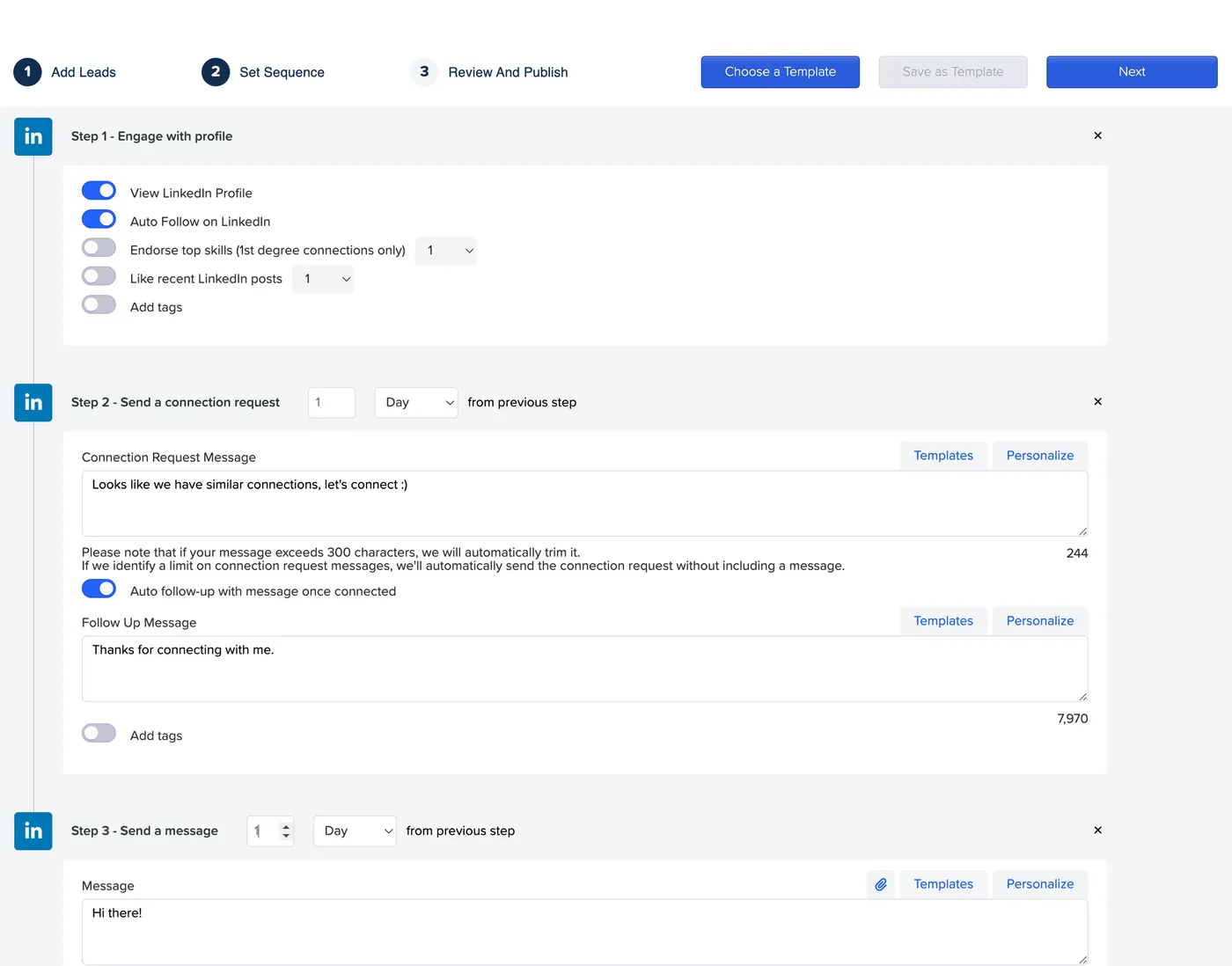
Creating a campaign. The dashboard puts a single "Create campaign" button front and center. We picked "LinkedIn search" as the lead source and targeted startup founders. Two limits stood out: filtering was basic (no company size or funding filters at the time), and the sequence builder, a vertical list of steps, gets hard to read once a sequence grows.
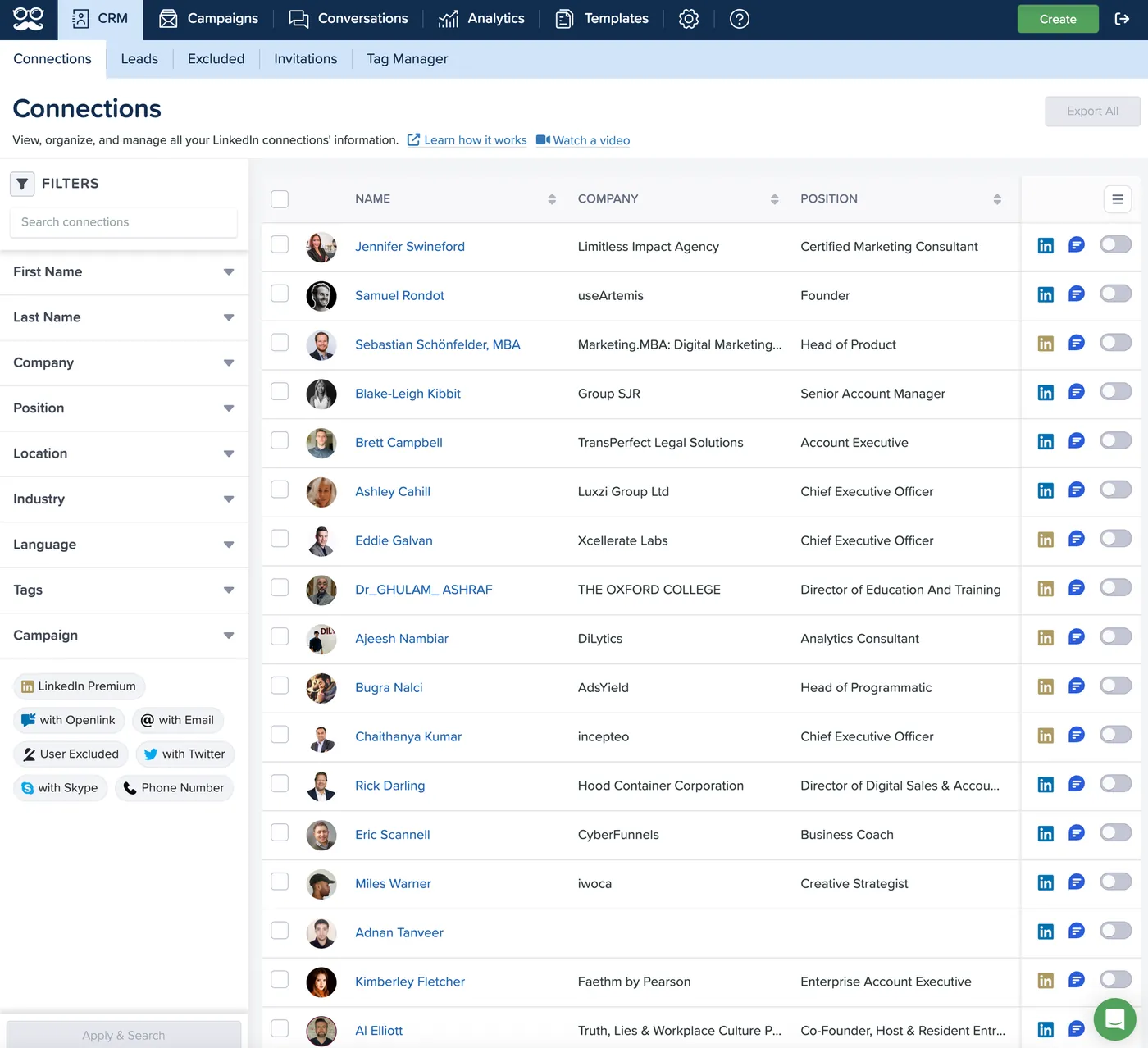
The CRM was our favorite part. In two clicks you can search a lead, exclude contacts from campaigns (useful for prospects already in talks) and filter by "with email", "with Twitter" or "LinkedIn Premium".
Support answered our questions without issue, and the help center and video tutorials cover most setup questions.
Pros and cons
| Pros | Cons |
|---|---|
| Fully cloud-based, no extension or app to install | Individual plan is LinkedIn-only and lacks Sales Navigator |
| LinkedIn, email and X in one sequence (Business) | Multichannel needs Business at $99/seat/month on monthly billing |
| Useful CRM, smart inbox and automated greetings | Lead filtering was basic in our test |
| Social post scheduling included from Business | Sequence builder less visual than some competitors |
| Up to 40% off with yearly billing, white label on Teams | Teams plan requires 3 seats minimum |
Verdict: is Meet Alfred worth it?
For a solo user on a yearly plan, Meet Alfred is reasonably priced: $59/month on yearly billing gets you Business with LinkedIn, email, Sales Navigator and InMails in one cloud tool. The CRM, greetings and post scheduler are nice extras if you also manage your LinkedIn presence.
On monthly billing it competes head-on with Expandi and Dripify at $79 to $99 per seat, and those tools go further on safety settings or sequence design. If you need lead data with verified emails, you'll have to add another tool, or pick an alternative that includes it.
Meet Alfred vs Expandi vs Dripify
These three cloud tools are the most common comparison. Prices are per LinkedIn seat, monthly billing, October 2026.
| Meet Alfred | Expandi | Dripify | |
|---|---|---|---|
| Entry price | $59 (LinkedIn only), $99 with email | $99 ($79 yearly) | $79 ($59 yearly) |
| Email steps | Business plan | Yes | Yes |
| Other channels | X, social post scheduling | Images, GIFs and video personalization (add-ons) | No |
| Safety features | Human behavior simulation, regional proxy (seen in our test) | Dedicated country-based IP, auto warm-up | Human-like pacing |
| Free trial | Yes, no card | 7 days | 7 days, no card |
| Best for | LinkedIn + social presence | Safety-first outreach and agencies | Simple, clean LinkedIn + email drips |
The best Meet Alfred alternatives in 2026
Prices checked on each vendor's pricing page in October 2026, monthly billing unless stated otherwise.
| Tool | Type | Starting price | Email steps | Best for |
|---|---|---|---|---|
| useArtemis | Cloud | $69/month (2 LinkedIn accounts) | Yes | LinkedIn + email with leads and verified emails included |
| Expandi | Cloud | $99/month per account | Yes | Dedicated IPs and agency features |
| Dripify | Cloud | $79 per user/month | Yes | Simple drip campaigns |
| Skylead | Cloud | $100 per seat/month | Yes, unlimited mailboxes | Advanced conditional sequences |
| HeyReach | Cloud | $79 per LinkedIn sender/month | Via Instantly, Smartlead or EmailBison | Agencies with many accounts |
| Waalaxy | Cloud | €39 per user/month (€19 yearly) | Business plan | Beginners and low budgets |
| Linked Helper | Desktop app | $15 per account/month | No | The lowest price, if your computer can stay on |
1. useArtemis
useArtemis is a cloud LinkedIn + email prospecting platform with lead data built in. You find leads in Discover (a B2B database with verified emails) or export them from LinkedIn and Sales Navigator searches with the LinkedIn scraper, then run sequences mixing LinkedIn steps (invitations, messages, profile visits, likes) and emails. Messages are personalized by AI, replies from both channels land in one inbox, and accounts follow safe limits at a human-like pace. Starter costs $69/month for 2 LinkedIn accounts, 500 verified emails and 2,500 Discover leads; Scale ($159) covers 5 accounts and adds automatic AI replies; Agency ($399) covers 10. You can start with a free account, no credit card required. Versus Meet Alfred: two LinkedIn accounts and email steps for less than one Business seat on monthly billing, plus verified emails; Meet Alfred adds X outreach and social post scheduling.
2. Expandi
Cloud automation with a dedicated country-based IP, auto warm-up and smart limits, plus email steps and image/GIF personalization. $99/month ($79 yearly), 7-day free trial; agency plans with white label from 10 seats. Read our Expandi review.
3. Dripify
Clean LinkedIn + email drip campaigns, with 100 email finder credits per month on paid plans. Pro at $79 per user/month ($59 yearly), Advanced at $99 ($79 yearly), 7-day trial without a card. See our Dripify review.
4. Skylead
Known for conditional "smart sequences" that combine LinkedIn and email, with unlimited mailboxes, an email finder and image/GIF personalization. $100 per seat/month, 7-day free trial.
5. HeyReach
Built for agencies: pricing per LinkedIn sender ($79/month on Growth), unlimited users, unified inbox, white label on agency plans (from $999/month for 25 senders).
6. Waalaxy
The budget pick for beginners: Pro at €39 per user/month on monthly billing or €19 billed yearly (300 invitations a month), email sequences on Business. Our Waalaxy review explains the plans.
7. Linked Helper
A desktop app rather than a cloud tool: $15 per LinkedIn account per month (Standard), with very deep LinkedIn automation, but your computer must stay on. Details in our Linked Helper review.
Whatever tool you choose, keep volumes reasonable: here is how many LinkedIn invitations you can send per week. For a broader comparison, see our list of the best LinkedIn automation tools.
FAQ
How much does Meet Alfred cost?
As of October 2026: Individual $59, Business $99 and Teams $79 per seat per month on monthly billing (Teams needs 3 seats). Yearly billing cuts 40%, bringing them to $35, $59 and $47 per seat per month. Unlimited is on quote.
Does Meet Alfred have a Chrome extension?
No. Meet Alfred runs entirely in the cloud, with no browser extension or software to download. You connect your LinkedIn account in the web app and campaigns keep running when your computer is off.
Is Meet Alfred cloud-based?
Yes. Campaigns run on Meet Alfred's servers, so you don't need to keep a computer or browser open. When we tested it, Meet Alfred also assigned a proxy in our region to keep the LinkedIn connection consistent.
Which is better, Meet Alfred or Dripify?
Dripify is simpler and cheaper for LinkedIn + email ($79 vs $99 per seat on monthly billing) and includes email finder credits. Meet Alfred is the better pick if you also want X outreach, social post scheduling and a LinkedIn CRM, especially on yearly billing.
Does Meet Alfred offer a free trial?
Yes, Meet Alfred offers a free trial without a credit card. The trial length isn't shown on the pricing page, so check it when you sign up.