Expandi.io Review 2026: Pricing, Features, Pros and Cons + 6 Alternatives
Samuel Rondot
9 min read
On this page
Expandi.io is a cloud-based LinkedIn automation tool that also sends email follow-ups in the same sequence. It has a single self-serve plan: $99 per LinkedIn account per month, or $79 a month billed annually, with a 7-day free trial (prices as of October 2026). Agencies with 10 or more accounts get custom pricing and a white-label option.
Our short verdict: Expandi is a solid choice for sales teams and agencies that want LinkedIn outreach running 24/7 in the cloud, with a dedicated IP and conditional sequences. It's less convincing if you need to find leads and emails inside the tool, or want AI to write each message for you without leaving the app.
Expandi at a glance
| What it is | Cloud LinkedIn automation with email follow-ups |
| Company | ProfitSoft BV, Eindhoven (Netherlands) |
| Channels | LinkedIn + email |
| Price (Oct 2026) | $99/seat/month, or $79/month billed annually |
| Agency plan | Custom pricing from 10 seats, white label available |
| Free trial | 7 days |
| Needs Sales Navigator? | No (but you need it to run Sales Navigator searches) |
How much does Expandi cost in 2026?
Expandi keeps pricing simple. As of October 2026, from the official pricing page:
| Plan | Monthly billing | Annual billing | What you get |
|---|---|---|---|
| Business | $99 per seat/month | $79 per seat/month | All features, one LinkedIn account per seat |
| Agency | Custom | Custom | 10+ seats, roles and permissions, client reports, dedicated CSM, white label |
A few things to know before you budget:
- One seat = one LinkedIn account. Three sales reps cost $297 a month on monthly billing. Expandi's FAQ says you may get a discount for multiple accounts by asking support.
- Some personalization costs extra. Personalized images and GIFs require a Hyperise subscription, and video personalization goes through Sendspark as a paid add-on.
- The trial needs a card. Expandi says you won't be charged until the 7 days are up. When we signed up, card details were requested before the trial started.
The price hasn't moved since we tested Expandi in 2024 ($99 a month); the annual option at $79 is the main way to pay less.
What Expandi does
- Smart sequences: combine LinkedIn actions (connection requests, messages, InMails, post likes, follows, skill endorsements, event invitations) and email steps, with "if/then" conditions based on what the prospect does. Expandi says you can mix 10 actions and 10 conditions.
- Account safety: cloud-based, a dedicated IP address based on your country, gradual profile warm-up and configurable limit ranges.
- Campaign management: unlimited campaigns, campaign prioritization (focus your limits on the campaigns that perform), A/B testing, campaign recovery, blacklist and duplicate prevention.
- Personalization: dynamic placeholders, plus images, GIFs and videos through Hyperise and Sendspark.
- Lead sources: LinkedIn and Sales Navigator searches, CSV imports, and people who engage with posts, groups and events.
- Team features: workspaces, roles and permissions, all connected accounts in one dashboard, and white label on the Agency plan.
- Integrations: native HubSpot and Pipedrive integrations, plus webhooks for other tools.
What's new in 2026: Expandi MCP
The biggest change since our test is Expandi MCP, currently in private beta. It connects an AI assistant such as Claude or ChatGPT to your Expandi account. Expandi says the assistant can qualify leads against your ideal customer profile, draft multi-step campaigns in the builder, draft replies in the inbox and diagnose why a campaign stopped sending. It stays inside your daily limits, never activates a campaign on its own, and nothing is sent without your approval.
It's a sensible design if your team already works in an AI assistant. Inside the app itself, personalization still relies mostly on placeholders and visuals rather than an AI that writes a different message for each lead.
Our hands-on test of Expandi
We tested Expandi in May 2024. Some screens have probably changed since, but the workflow is the same.
Getting started. After the sign-up form and a short onboarding questionnaire, Expandi asks you to connect LinkedIn, either through its Chrome extension or with your LinkedIn email and password. You then pick your country so the dedicated IP matches your location, and enter card details to start the trial. Syncing the account took a few minutes.
Creating a campaign. The guided setup asks for your ideal customer profile, then imports matching prospects and suggests a "Connector" campaign: an invitation to 2nd and 3rd-degree connections, a first message and three follow-ups. The editor is clear. The "AI message" button helped draft a template, but it writes one template for everyone, not a different message per prospect.
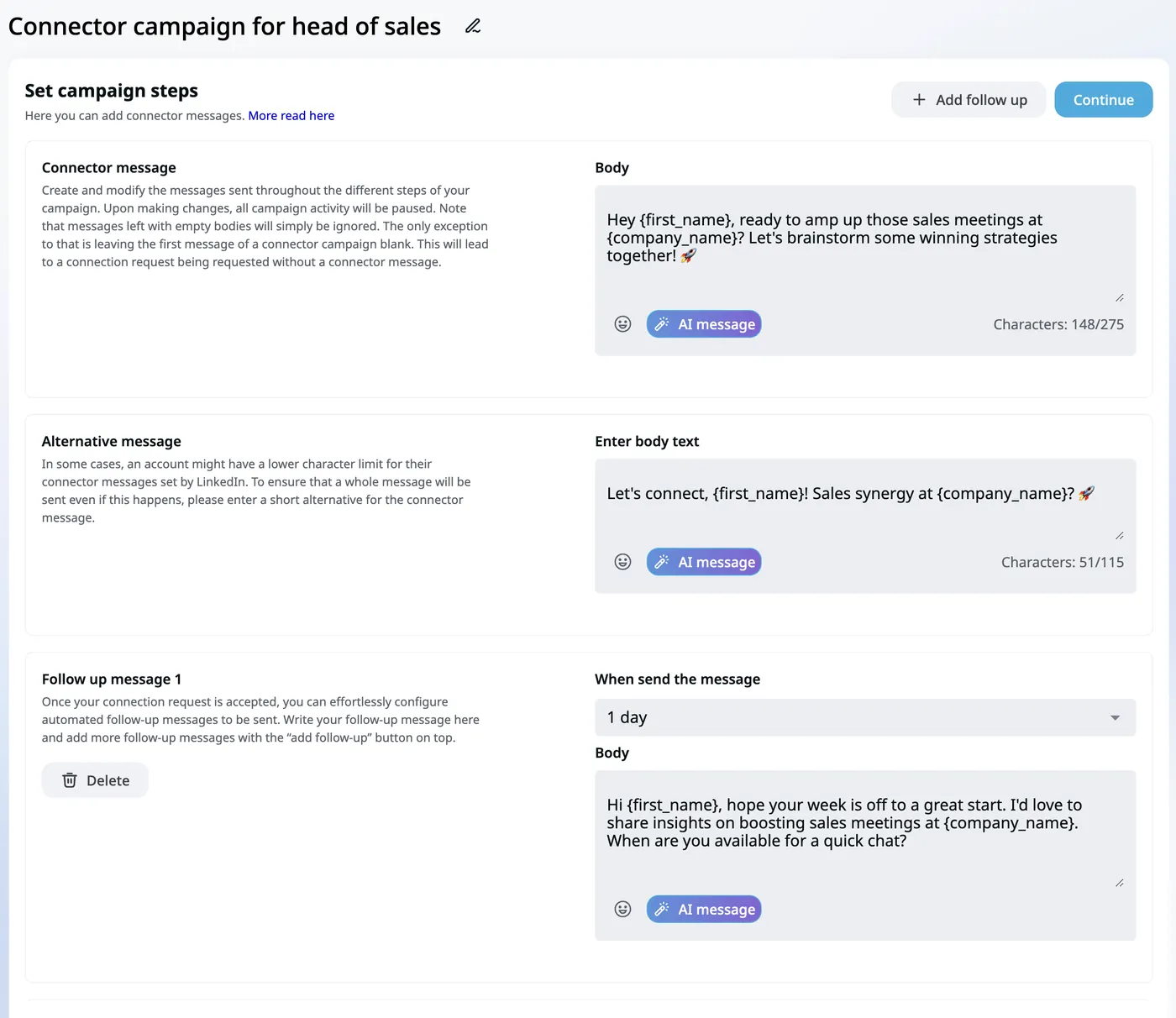
Scheduling and dashboard. You set your time zone and working days before launch, which is good practice for a natural pace. The dashboard was less intuitive: right after launch, no pending tasks appeared and it wasn't obvious whether the campaign was running. We liked the Social Selling Index tracking.
Pros and cons of Expandi
Pros
- Runs 24/7 in the cloud, no need to keep a computer on.
- Dedicated country-based IP, warm-up and adjustable limits.
- Flexible conditional sequences mixing LinkedIn and email.
- Every feature in a single plan, with no feature tiers to compare.
- Strong agency setup: workspaces, permissions, client reporting and white label.
- MCP integration for teams that work through an AI assistant.
Cons
- $99 per account adds up quickly for teams.
- No built-in B2B database or email finder: you bring your own leads and emails.
- In-app AI only drafts templates; per-lead AI writing goes through the MCP beta.
- Images, GIFs and videos require paid third-party add-ons.
- The trial requires card details, and it's only 7 days.
- The dashboard took us a while to read.
Who is Expandi for? Our verdict
Expandi fits sales teams and lead-gen agencies that already have their lead lists and want a safe, always-on LinkedIn engine with email follow-ups and conditional logic. Agencies get the most out of it thanks to workspaces and white label.
If you're a solo founder on a budget, you'll pay less with Waalaxy or a desktop tool. If you need the full chain (find leads, find emails, write personalized messages, send on LinkedIn and email), an all-in-one platform saves you from stacking three subscriptions.
Whatever tool you pick, remember that LinkedIn's User Agreement prohibits unauthorized automation. Limits and a human pace reduce the risk of a restricted account, but no tool can remove it entirely.
The 6 best Expandi alternatives in 2026
Prices as of October 2026, from each vendor's pricing page.
| Tool | Best for | Channels | Starting price | Free trial |
|---|---|---|---|---|
| Expandi | Teams and agencies, cloud safety | LinkedIn + email | $99/seat/month ($79 annually) | 7 days |
| useArtemis | All-in-one: leads, emails, outreach | LinkedIn + email | $69/month for 2 LinkedIn accounts | 7 days, card required |
| HeyReach | Agencies with many senders | LinkedIn (email via integrations) | $79/sender/month; Agency $999/month for 25 senders | Yes |
| Dux-Soup (STACKED) | LinkedIn-only, desktop or cloud | $55/seat/month (Local), $99 (Cloud) | 14 days | |
| Waalaxy | Small budgets | LinkedIn, + email on Business | €19/user/month billed yearly (€39 monthly), up to €69 (Business) | 14 days |
| Dripify | Simple LinkedIn + email drips | LinkedIn + email | $79/user/month ($59 annually) | 7 days |
| La Growth Machine | Advanced multichannel sequences | LinkedIn + email (+ calls, X) | €60/identity/month (€50 annually) | 14 days |
1. useArtemis: find leads and contact them in one place
useArtemis is our product, so read this with that in mind. Where Expandi starts from a lead list you already have, useArtemis also builds the list: a B2B lead database with verified emails, a LinkedIn and Sales Navigator scraper, an email finder and AI enrichment. Sequences mix LinkedIn steps (invitations, messages, profile visits, likes) and email steps, the AI writes a personalized message for each prospect, and LinkedIn and email replies land in one inbox. Automatic AI replies are included from the Scale plan.
Pricing as of October 2026: Starter $69/month (2 LinkedIn accounts, 500 verified emails, 2,500 leads), Scale $159 (5 accounts), Agency $399 (10 accounts), with credits that roll over. No free plan, but Starter comes with a 7-day free trial (card required). See pricing.
2. HeyReach: built for agencies running many accounts
HeyReach prices by sender and makes the most sense at scale: $79 per sender per month on Growth, $999 a month for 25 senders on Agency (white label included) and $2,999 for its Unlimited plan, with discounts for quarterly and yearly billing. It includes a unified LinkedIn inbox, an MCP server and integrations with Instantly and Smartlead for the email side.
3. Dux-Soup (STACKED): the LinkedIn-only veteran
Dux-Soup replaced its Chrome extension with STACKED, a desktop app, in September 2026. STACKED Local costs $55 per seat and runs on your computer; STACKED Cloud costs $99, like Expandi. It covers LinkedIn, Sales Navigator and Recruiter with AI-personalized messages, but has no email steps. See our Dux-Soup review.
4. Waalaxy: the budget pick
Waalaxy is cloud-based and starts at €19 per user per month billed yearly (€39 monthly; Pro, 300 invitations a month). Advanced (€49 yearly, €99 monthly) raises the cap to 800 invitations and Business (€69 yearly, €139 monthly) adds cold email and 500 email-finder credits. It's easy to start with but less flexible than Expandi's conditional sequences. Read our Waalaxy review.
5. Dripify: Expandi's closest cloud competitor
Dripify runs LinkedIn and email in the same sequence on every plan and includes 100 email-finder credits per month. Pro costs $79 per user per month ($59 annually) and Advanced $99 ($79 annually), with A/B testing and team management. Our Dripify review goes deeper.
6. La Growth Machine: for complex multichannel playbooks
La Growth Machine adds lead enrichment, LinkedIn voice messages, calls and X to LinkedIn and email sequences, with a shared inbox. It's billed per identity: €60/€120/€180 per month for Basic, Pro and Ultimate (€50/€100/€150 billed annually), with a 14-day trial. See our La Growth Machine review.
More options in our guide to the best LinkedIn automation tools.
FAQ
How much does Expandi cost?
As of October 2026, Expandi's Business plan costs $99 per LinkedIn account per month, or $79 per month with annual billing. It includes all features. Agencies with 10 or more seats get custom pricing and white label, and image, GIF or video personalization costs extra through Hyperise and Sendspark.
Does Expandi have a free trial?
Yes, a 7-day free trial with full access. Expandi says you're not charged until the 7 days are over, but card details are requested when you sign up, so cancel before the end if you don't want to continue.
Does Expandi use AI?
In the app, Expandi's AI helps draft message templates, while personalization relies on placeholders, images and GIFs. Since 2026, Expandi MCP (private beta) lets an AI assistant like Claude or ChatGPT build lead lists, draft campaigns and draft replies in your account, with your approval before anything is sent.
Who owns Expandi and where is it based?
Expandi's website lists ProfitSoft BV, based in Eindhoven in the Netherlands, as the company behind the product. Expandi works with free LinkedIn accounts, Sales Navigator and Recruiter.
Is Expandi safe for my LinkedIn account?
Expandi is designed to limit risk: cloud-based sending, a dedicated IP in your country, warm-up and limit ranges. But LinkedIn's terms prohibit unauthorized automation, so no tool is risk-free. Start slowly, stay well under the weekly invitation limits and personalize your messages.
If you'd rather find leads, get their emails and run LinkedIn + email sequences from one tool, create your useArtemis account.